Dust

Dust is in various ways a problem for photographers. Back in the old darkroom days cleaning negatives well could save hours of work spotting your black and white prints, and if you had dust on the film in the camera it would give black spots that were even tricker to remove. Sometimes it was possible to bleach them out on the wet print, or you could physically remove them with a scalpel from the finished print, and both were pretty tricky.

Dust is a problem when scanning negatives and slides too, and glassless carriers which took away much of the problem in the darkroom don’t seem to be made as well for scanners as for the best enlargers.  You soon get into a routine of using a ‘Rocket’ or other powerful air blower on every surface before each scan. But the good thing about scanning is that it becomes relatively easy to retouch the scans and remove black and white spots as well as scratches etc.

Digital images, at least those from cameras with interchangeable lenses, tend to suffer from dust too.  I give the rear of all my lenses and the mirror chamber a good blast with the Rocket at least once a week before going out to take pictures, and then lock up the mirror to give the sensor the Rocket treatment.

Having replaced the lens I turn the camera off to bring the mirror down, then on again so I can finally use the camera’s built-in dust removal. It is perhaps more a ritual than effective cleaning, but it does appear to keep problems at a minimum.

Even so, there does tend to be a build-up of dirt on the sensor, although it fortunately is seldom very noticeable in the images. It usually only shows up badly in even areas such as skies, and Lightroom or other software has the tools to make short work of it.

Dust did seem to be much more of a problem with earlier DSLRs. I remember having to swab off my sensor perhaps monthly with the D100 and D70, while I can’t remember ever having done it with the D700.

But what brings dust to my mind today is not cameras but computers. I switched my main machine on late on Tuesday, but it wouldn’t start. Today the computer engineer told me that dust had been the problem, as he took the box away for a motherboard replacement and general sprucing up.

It is around five years old, so time for something new, and I already have a high-spec replacement machine on order, intending to keep this as a backup. But it is a very considerable inconvenience having to re-install software and after I get the new sytems I’ll have days of work to get back to normal running.   Fortunately most of my important files are backed up, and I hope I will lose very little.

I could have saved much of this by regular dust removal from inside my computer, opening the case and carefully cleaning out the dust from it. The large fan over the processor had become clogged up with dust, though it was still spinning around it was no longer doing it’s job at cooling the processor.

One of the things that I’m currently without is my diary, but once I get computers back to normal, one thing I’ll be sure to add – and with an annoying reminder to make sure I notice it – is a task that recurs every six months, to dust my computer.

I’m typing this on a notebook computer with little or no dust problem so far as I’m aware, though a slightly cramped and unresposive keyboard. I’d hoped to get back to more regular posting this week both here and on My London Diary after a very busy time over the past few months, but my dust problems have put paid to that for the moment.
Closer To Ideal?

Eleven years ago in another place, I wrote an article ‘Digital Wishes‘ when I looked forward to what the camera of the future might be. I wanted something that was small, light, responsive and flexible (and with a decently extreme wide-angle) and had a few suggestions, including:

For a digital camera system, the obvious first step is to remove the mirror and pentaprism, replacing them by a digital viewfinder system,”

It was certainly the most contentious article I’ve ever written, and e-mail after e-mail came in and there were long and at times rather bitter arguments on an online forum I belonged to, with many posters telling me exactly why the laws of physics said that some of the things that I suggested just were not possible.

Most of them have I think been implemented now, though sometimes a little differently from how I envisaged them, and there are many more features I hadn’t thought of (or didn’t and still don’t want) in some of the newer cameras, but I’m still waiting for my perfect camera, or even one good enough to tempt me away from the heavy DSLR outfit that has been weighing down my left shoulder for years. (I had to give up on my right side thirty years back.)

Looking at the ‘first impressions’ on the web of the Sony NEX-7 announced in August it looks as if we may have the first truly usable digital viewfinder (it’s also in another Sony) for still cameras (although some others such as the Fuji X100 are close.) And although the NEX-7 seems slightly ugly it does appear to manage to get an awful lot in a rather diminutive body.

I’m not a great fan of Sony, but they do seem to have tried in the NEX-7 to produce a camera that has taken a new look at what photographers want and tried to provide it rather than produce cameras that look very much like classics but don’t really provide the features we want (and I include the Fuji FX100 in this, much as I like it.)

It’s a shame that Nikon seem to have put so much effort into a new format camera that can’t quite give the quality we need and that Fuji’s second attempt suffers from an even worse small format problem. If it really performs as well as the early views suggest, the NEX-7 might just mean we can take some strain off our shoulders, though there are one or two disappointing aspects.

One for me is the over-large file size at 24Mp, and another is the lack so far of any real wide-angle. The widest lens is a 16mm (24 mm equiv) and there are 0.75 and fisheye converters but although I’ve seen sample pictures on a Japanese site I’ve so far found no really detailed reviews, though this user review by ‘TRA’ on Amazon is encouraging.  But what I’d really like is a good zoom that gets down to perhaps 11 or 12mm at the wide end, rather than having to fiddle adding a converter for the wide pictures. I could live with having to do this for a fisheye, as that’s a little more specialised.

There are really very few occasions when I’ve felt any need for more than the 12 megapixels that my current cameras provide, though I have used some very much large files. Doubling the number of sites on a chip is unlikely to provide any real advantage and is likely to result in higher noise levels as well as larger files. I’ve a 40×30″ print from a 12Mp file (corrected somewhat from a fisheye view and actually probably only using rather less than 9 of those 12 Mp) in my ‘Secret Gardens’ show at the moment, and elsewhere there is a 2.3 metre wide image in a public exhibition which was made from a 6Mp image taken on a Nikon D100.

We are bound to read some glowing articles on the new Nikon 1 system shortly, with journalists from the major magazines being treated to trips out to Japan and lavish hospitality. Of course it won’t affect their objectivity:-)  Nor of course will Nikon’s huge advertising spend that they depend on to keep in business.  But the Nikon 1 has a sensor less than 1/3 of the area of the Sony, and that is just too big a hill to climb. So get ready with the salt for when the guys report from their expenses-paid trips. It used to sometimes annoy me when I wasn’t allowed to accept such offers when I wrote professionally, but I can see why we had a strict code of professional ethics.  It is perhaps surprising that such codes apparently don’t apply elsewhere.

The Nikon 1 will almost certainly be a good camera as compact cameras go – and probably more than a match for the recently announced Fuji X10, which has an even smaller sensor, about half the size of the Nikon 1. But it isn’t going to be batting in the same league as cameras like the NEX-7.

Opening Night

© 2011, Peter Marshall
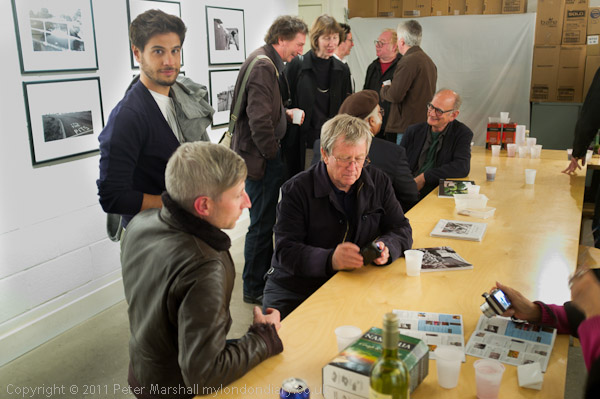
Towards the end of the evening when most people had left it was truly an elite gathering

Magical. It was for me at any rate, though adrenaline and alcohol are always a heady mix. Although our opening last night at the Shoreditch Gallery/The Juggler was never particularly crowded, there was a steady stream of people coming to see the show and pay their respects before moving on to one of the many other openings. First Thursdays are often busy, but this one especially so, as it was also the first Thursday of the UK’s largest photo festival, the East London Photomonth.

I’d had several apologies from photographers who were out of the country – and had to send my own to several who were at their own openings elsewhere across London. But among those who came to the opening were a good cross-section of the better photographers of the capital, as well as other friends who we were also pleased to see.

Even after we’d left the gallery – well after the agreed closing time – and a small group of us were talking outside, another dozen people turned up to look at the work.

As well as the 12 pictures I had on show, I’d also taken along the book ‘Before The Olympics‘ (and some others) with another 250 or so pictures from the Lea Valley. As several people pointed out to me, the reproductions of the pictures on the wall in that volume were considerably less subtle and less rich than the prints on the wall. Although Blurb, especially using the more expensive premium paper, does a reasonable job, it can’t match either a good darkroom print or a good inkjet print.

The prints I had on the wall were all made using Epson Ultrachrome K3 inks on Ilford Gallerie Gold Fibre Silk, and it is a very good combination. I’ve experimented with printing from the R2400 using just the three black inks in the K3 set (photo (gloss) black, light black and light black) which you can do using the Bauhaus Rip (or presumably with the Quadtone Rip) and although the results are good in terms of tonality, the prints have a slightly unhealthy looking greenish black in daylight. The best results I’ve acheived with this ink/paper combination come from using Epson’s own ABW (advanced black and white) mode, which allows you to alter the print colour and uses a small amount of the colour inks along with the three blacks.

I’d printed the set using the same print colour settings, and under daylight they were a pretty good match, but in the gallery lighting there were some noticeable differences in tone. I suspect this comes from different light bulbs (or perhaps just different ageing of bulbs) used in the display lighting. Some had a slight magenta to the black which fellow exhibitor Mike Seaborne tells me is normal for the Epson inks under tungsten lighting, while others were if anything more neutral than in daylight. I didn’t find the differences a problem, although Mike prefers to use HP printers as he says their inks exhibit little or no metamerism.

Back in the 1980s I printed these pictures – and all my best work on Agfa papers, mainly Agfa Record Rapid, which had something of a cult status among photographers (and which the late Peter Goldfield set up a company, Goldfinger,  with premises above his Muswell Hill pharmacy to import) and occasionally the rather warmer Portriga Rapid. But Record Rapid (and its Portriga cousin) had to change its formulation to cut out the cadmium in the nineties, and the new version was simply not the same. I moved to using Ilford papers, which were fine, but no match. Probably the next prints that I was truly happy with were on matte papers such as Hahnemuhle German Etching and Photorag using Piezotone inks from Jon Cone. They weren’t Record Rapid but had a rather different quality of their own.  Now with newer semi-gloss papers – such as the Ilford Gold Fibre – I can get prints which, with the advantage of the precise control offered by working with scanned digital files, are usually even better than those from the old days. Though RR could have a depth and a pearly opalescence that was only ever surpassed in the very best (and rather rare) examples of carbon printing.

The night also brought home again one of the small design faults of the Fujifilm FX100, the rather light detent on the exposure compensation dial, which is also perhaps a little too conveniently placed at the back right corner of the top plate. With a fewer glasses of Merlot I would certainly have realised that I was working at +2 stops and avoided the overexposure that ruined most of the images. And +2 stops when working at full aperture makes for long shutter speeds, so pictures were blurred as well as overexposed. But I hadn’t gone there to take pictures and wasn’t giving it my usual attention, so there are rather fewer images in this post than I would have hoped.

Secret Gardens Opening Pictures

One event I decided not to photograph was the opening of my ‘Secret Gardens of St John’s Wood‘  show last week. Although I had taken a camera along with me and was wearing it around my neck I didn’t take a single picture. So I was pleased to see Paul Baldesare taking some pictures at the event – and he handed the camera over to Jiro Osuga at one point.

I didn’t want to take pictures because I was too busy and perhaps too involved to work sensibly; it was really nothing to do with having drunk several glasses of red wine, very necessary to keep my voice working with all the talking I was doing!

© 2011, Paul Baldesare

This is a nice picture of Dr Cathy Ross opening the show, with a couple of photographers in the background.  Like the other pictures in this post it was taken with a Panasonic DMC-GF2 with a 14mm lens at ISO 640. Although the quality seems fine, it does point out a big difference between the 4/3 format and cameras such as the Nikon D700 where I would have happily been working at ISO 3200, more than 2 stops faster, or even faster, and working without flash, or if I’d brought the SB800 as well, adding a bit of bounce flash.  Of course there is a balance and the DMC-GF2 is a lot less to carry and perhaps easier to use than a D700 + SB800 combination  – and a lot cheaper. In favour of the larger combination are quality and flexibility.

© 2011, Paul Baldesare

Several of the garden owners are in the next picture, along with a few of the others present. But the 14mm in a fairly small space only shows a fairly small section of those present, with its 28mm equivalent field of view. Its the kind of situation where something wider – like the 16-35 mm on the D700 or the 10-20mm on the Nikon D300 (or perhaps better still the Nikon 10.5mm full-frame fisheye) come into their own.

© 2011, Paul Baldesare

The smaller format also I think shows its limitations in this image, where it hasn’t coped too well with the dynamic range. But I’m pleased to have these pictures of the event and Paul has done a good job in catching some of the  gestures and expressions of the people involved in the fairly short formal proceedings of the evening, particularly since I suspect he was ahead of me on the wine.  But they do I think show the limitations of the equipment, and confirm my decision for the moment not to invest in one of these more compact systems.

© 2011, Paul Baldesare

The final picture I’ll include is perhaps a good example of subject failure, if not in the classic sense of the term. I’m really rather better behind the camera than in front of it, seen here thanking Dr Ross for her speech.

But in the end the best camera is the one that was there – and was used by someone who knows how to use it – and my thanks to Paul for the pictures. You can see some better example of his work in our show together (along with Mike Seaborne, who appears in most of the pictures above) East of the City – which will be open to the public from Saturday.

Dog Makes Garden Panorama

Thursday’s formal opening of my show ‘Secret Gardens of St John’s Wood‘ went well, decently full without being too crowded, and I had the time to talk to most of the people who came, though as usual forgot to say some things I had meant to. And people seemed genuinely to like the work, with quite a few buying copies of the book – currently only available from the Queen’s Terrace Café where the show continues Mondays to Saturdays until the easily remembered date of 5th November.

Dr Cathy Ross from the Museum of London gave a short opening address, linking my work to a project the museum had carried out some 20 years ago, and stressing the importance of documentary work such as this which created a record of what otherwise would be a largely unknown aspect of social history.

It was good also to meet again (or in some cases for the first time) some of the garden owners and hear their views, mostly very complimentary, of my pictures.

One image that attracted quite a bit of attention was the only non-rectangular image in the show, and one that came about rather by chance. Before I took each image for the project I carefully chose a particular viewpoint and thought about how to make a picture in terms of the horizontal and vertical limits of a virtual rectangular ‘frame’ I was going to fill*, and this image was no different.

Almost the entire project involved a different way of working to my normal photography and there is not a single image in the show (though a few in the book) that I could actually see in a viewfinder when I took the image. Most are put together from between 3 and more than a dozen separate exposures to produce the picture I had in mind before taking them.

© 2011, Peter Marshall
The image as it is in the show, on a 40″ x 30″ dark grey background

This shows the view, invisible from the street, that hits you immediately when you gain admission via the entry-phone to the high-walled garden, and was taken with my back literally against the door. It was a busy afternoon at the house, and I had to work quickly in case someone came to the entrance, when I would have had to interrupt taking the picture and move my tripod out of the way.

Like most of the pictures in the show, it was taken on the D700 using the 16-35mm lens in portrait format, usually at the 16 mm end, giving a vertical angle of view of 96 degrees.  A series of exposures was then made, taking pictures at roughly 30-40 degree intervals to get a considerable overlap between each image (at 16mm the lens covers 73 degrees across the shorter dimension.)

I always started taking pictures where I intended one edge of the picture to be (normally the left), placing that in the centre of the first frame and tried to end it with where the far edge in the centre of the last frame.

To join the images, the software first alters their shape to suit the projection being used, changing the rectangular images into ones with curved edges. When the frames are combined to give the overall image, this results in an irregular shape with wavy edges, which are then normally trimmed off to give you a rectangle. One of the reasons for using a lot of overlap when shooting the series is that this makes the ‘waves’ shorter and thus less deep, and you have to trim less.

This strip of garden between the gate and front door was actually fairly narrow, and I decided that a single row of images would not give sufficient vertical coverage to include the chimney of the house. I need to use either two rows in portrait format or three rows in landscape format, and chose the second.

I had decided to start the image to include the small tree at left and to end it with the larger tree at right. What I had in mind was an image rather like this crop (though with sky where there is a black rectangle at the top and a little more of the path at the bottom.)

In the end it didn’t quite happen like this, and, thanks to the dog I ended up with a rather better picture, if one that some people are confused by. They interpret the picture with its dark grey background as being taken through some kind of gap in a fence, which although not literally the case, is certainly a good metaphor for what like the other images in the show is certainly a peep into the private domain.

As I was making the picture, one of the house residents, a large black dog, was running around the garden and watching me. I thought about cloning him in several images but decided more than one dog would be an unwanted distraction, and tried to avoid him. Finally, just as I was finishing the exposures I needed he came up and posed just in front of me and I took another exposure with him in the middle.

It was an image that didn’t fit the rectangle, which would have cut the dog in half, but rather than use a different exposure of the centre area of the path I could see two good reasons to include the image with the dog. The dog was beautifully positioned in a fine pose, tail leading up to the doorway of the house, and secondly the extra area of path in the centre of the image gave a much stronger impression of the path leading to the house.  It would have been difficult to include it in a rectangular image as the tripod legs would have appeared.

I took out a few of the 18 or so images I’d taken from the image to produce a slightly more attractive overall shape which you see, placing the image on a dark grey background – the same tone as used for the introductory page for each garden featured in the book.

But this is a picture which, if not taken by a dog, was certainly made by one.


Technical notes

Few of these panoramas stitch perfectly automatically, and most need a little assistance with appropriate masking of some of the images. Plants are not entirely static, especially on windy days, and anything very close to the camera is likely to be a problem, as it is hard to get absolutely precise positioning. Joins between images often need to be moved to areas where any slight misalignment is not noticeable, for example empty areas of wall rather than window frames.

All of the images shot RAW and were pre-processed in Lightroom before being combined in PTGui. Basic exposure, fill light, black point, brightness and contrast were simply synchronised across a set of images, but considerable care was needed to apply the ‘adjustment brush’ in the same way to matching areas on different frames.

* The projection used in assembling the images alters there appearance in a way that is hard to predict when taking the series of frames. Mostly I made use of an equi-rectangular projection which I think is a more general version of the cylindrical projection of my earlier film-based panoramas, but for some I found the newly rediscovered vedutismo projection worked better.

Lenses For Courses?

One of my favourite lenses over the past 18 months or so has been the AF-S DX Nikkor 18-105mm f/3.5-5.6G ED VR, rather a mouthful of a name, but a relatively compact lens for DX format cameras.  If you like to see detailed test results, you should go to Photozone.de, and they do make interesting reading in some respects.

No lens is perfect, but the faults in optical performance of this one – mainly some distortion and chromatic aberration – are largely easily and automatically corrected in software such as Lightroom, leaving you with images with some impressively good resolution. It’s a very good lens even wide open, and down a stop or so, truly excellent. Subjectively certainly the results are better than the previous Nikkors and Sigma lenses I’ve used covering similar focal lengths, some costing more than three times as much.  And perhaps even more importantly, autofocus is faster than the others.

But it is a ‘consumer’ lens and not a ‘professional’ one, and I’m someone who does tend to be rather hard on equipment.  Ten days ago, rushing along in a crowded street I collided with a rubbish bin. The UV filter on my Nikon 16-35 mm took it head on, the glass shattering to pieces. I was obviously worried about the lens itself (it cost almost six times as much as the 18-105), but it seems to be working perfectly – and now has a new UV filter. I’m thinking of taking out a standing order for these. Fortunately from Hong Kong they only cost around £3 rather than the £37.95 at my local camera shop. And you can also buy lens hoods for most Nikon lenses that are better made than the genuine article for a fraction of the cost.

It also rains fairly frequently in London, and the difference between consumer and professional lenses also shows.  Of course both get drops of rain on the UV filter, and I wipe it with a microfibre cloth before almost every exposure.  Lens hoods help a little, but are pretty ineffectual with wide angles. But while the 16-35 is pretty watertight and keeps on working in the rain, the 18-105 is very definitely not, and soon becomes unusable until I can dry it out.

While the 16-35 survived a major impact, the 18-105 has now jammed and is unusable. It happened while I was sitting on a train and reading a book with the camera on a strap around my neck. Perhaps I might have turned over a page hurriedly, but there were no other incidents that I noticed. The lens that had been working perfectly when I got on the train was jammed solid when I walked out of my station.

I’m left wondering what to do with the 18-105. I do have other lenses that will do most of what it did, though not quite as well. Most lens repairs that I’ve had done have cost around two thirds of the cost of the 18-105, so is it worth repairing? Should I simply buy a new 18-105, or get a larger and heavier pro lens?

At the moment the lens is sitting on my desk and will probably stay there for some time. Like many other Nikon users I’m waiting for Nikon to bring out the next round of DSLR cameras, replacements for the D700 and D300s. My D300 is definitely showing signs of age, and the shutter in particular is probably well past its design life, and as I noted in an earlier post, not working at its higher speeds. Will its replacement be a FX or a DX camera – or perhaps some other manufacturer than Nikon will come up with a smaller and lighter system that really delivers similar quality?

Swansong for My D300?

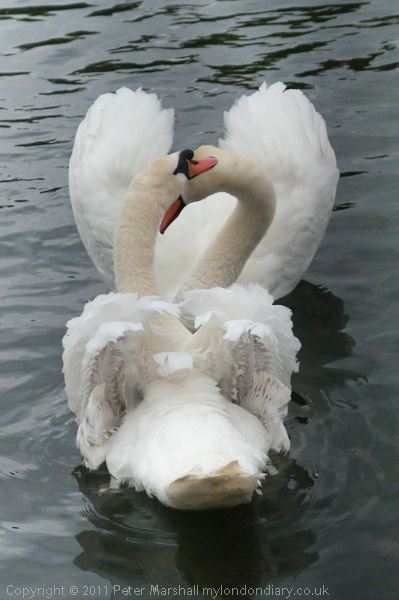
© 2011, Peter Marshall

I took this picture at lunchtime yesterday. I wouldn’t normally go out to take pretty pictures of swans, but yesterday I spent the morning travelling up the River Thames alongside the swan uppers, something I’ve done most years since I left full-time 9-5 work to become a freelance a dozen or so years ago.

Although I live just five minutes walk from a part of the river they go along, for 25 years or so I was always busy earning a living a few miles away when they came through. Sometimes the following week there would be a picture in the local paper of the boats in one of the local locks, but more often or not just a brief note or nothing at all.

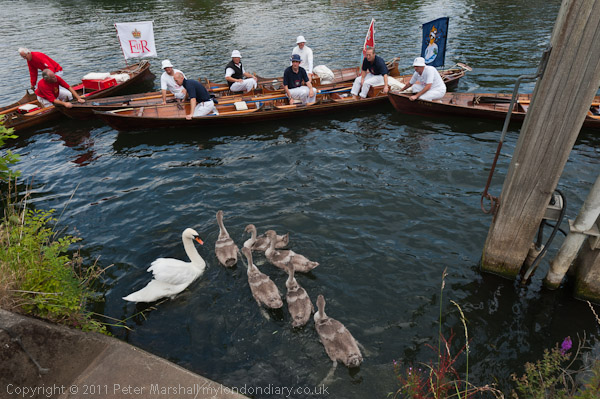
The first time I actually went to watch them at work was something of a revelation. I’d assumed it was simply a week of rowing up the river in fancy dress and making the most of the many riverside hostelries, but what I found was rather different, highly skilled men (as yet there are no women uppers) working together in an activity that now has some genuine environmental worth.

© 2011, Peter Marshall

It is a delight to watch them at work, their expertise in handling the boats to surround a pair of swans with their young, the brief struggle as they grab the birds out of the water, the careful way they handle and examine them before returning them to the river, where seconds later the family is swimming again as if nothing has happened and the men are getting back into the boats to continue their journey upriver.

We hadn’t seen a great deal of action yesterday, and there does appear to have been a considerable decline in mating pairs on our stretch of the river in recent years, and this year in particular several of them had no cygnets. Somewhere swans must be doing rather better, as at Staines and particularly Windsor, where tourists flock to feed them there are large herds of unattached swans.

I’d almost given up hope of taking more pictures of the uppers at work to add to my extensive collection when I saw the Swan Warden’s boat (a no-nonsense dinghy with an outboard) several hundred yards ahead had pulled over to stop near a couple of swans just a hundred yards or so short of the Swan Hotel where the uppers were to stop for lunch. It was on the other side of the river, but close to Staines Bridge, so I cycled madly (and a little badly) and managed to arrive on the towpath just in time.

The male bird had swum away, possibly frightened by the arrival of the launch carrying the journalists which had for once got ahead of the rowers or the small crowd who had gathered to watch, but the uppers were able to surround the female and her six cygnets and with their usual skill bring them to land. You can see a few of my pictures on Demotix, and more in due course on My London Diary.

But finally, after the cygnets had been ringed and the details recorded, the birds were carefully returned to the river, swimming out to meet their father. Last to be put in the water was the female swan, who immediately swam out to her mate, and I took a sequence of pictures of their reunion – of which the image above is one.

Although the swans were happy, I was not, because the picture above isn’t quite as I took it, as I did a quick and not quite complete exposure gradient correction in Lightroom. Below is the next frame from that sequence, totally uncorrected and as you can see the exposure differs greatly at the right side of the frame, taken with a Sigma 28-300 on the D300. By the time I arrived home twenty minutes later, the fault was even worse, with half the frame completely blacked out.

© 2011, Peter Marshall

I’ve actually had this fault before, a month or so back, but on just a few frames, and the camera had then returned to normal working. I had another event to photograph later on in the day, but I left the D300 at home and worked just with the D700, suffering from not always having the lens I wanted on the camera, and missing opportunities when changing lenses. I really have got used to working with two camera bodies.

This morning I picked up the D300 again and took a couple of test frames, and it was working perfectly. Looking at the EXIF exposure data there appears to be a link between this fault and fast shutter speeds. I hadn’t actually meant to take these pictures at 1/2000, but I had the camera on manual and this happened to be the setting when I saw this reunion take place, and the overall exposure was roughly correct. I hadn’t deliberately set such a fast speed, which I think was simply a case of idle fingers on the camera dial.

I’ve now tested this, and can reproduce the effect. The camera works fine up to around 1/1250, and at 1/1600 I can see some slight darkening on one side. At 1/2500 slightly over half the frame is dark and faster than this most or all. So at least I have some idea of what is happening, and know how to avoid it. It also means that when I take it – as I will need to one day – for the inevitably expensive repair I’ll be able to say exactly what the fault is, which considerably improves the chances of getting it repaired.  But perhaps Nikon will come out with something shortly (if they have recovered from the earthquake) which will mean that rather than repiar the D300 I will want to replace it.

What Camera…?

Probably many of you have read Vincent Laforet’s post from 3 weeks ago, What camera did I use to make this still picture? which has a photograph of a young girl at the top and invites you to zoom into the image actual size, asking you to guess what camera the picture was taken on.

The answer, which he reveals a couple of lines down the page, so I’m not really spoiling any secrets, is that it is a frame grab from a RED EPIC M digital cinema camera at 96 frames per second. As someone who wrote about RED cameras quite a few years ago I’m not surprised, though the quality is pretty breathtaking.

Laforet goes on to ask:

a lot of “big” questions… such as: “Does the challenge of capturing “THE DECISIVE MOMENT” still exist when you can capture a 14 megapixel image at 120 frames per second? ” For someone who idolized Henri Cartier Bresson and worked on mastering the capture of that “decisive moment” for most of my career – it is not a question I ask lightly. “Are the days of the “still camera” numbered?”

To some extent Laforet himself acknowledges that he is rather jumping the gun – this is a large and heavy camera which works best on the kind of support that an elephant could sit on shown in the picture of it lower down the page, and it costs in excess of $30,000. Of course technology always advances to bring things down in price and size, but I think we will be waiting rather a long time before something like this becomes both affordable and portable.

Cartier-Bresson and the other photographers of his generation took their pictures with a screw mount Leica (or a Contax rangefinder),  cameras not dissimilar in size or appearance to the Fujifilm FX 100, and later with the larger but still relatively diminutive M series.  These cameras were built around movie film, though they used twice the film area of 35mm movie cameras. But way back then it was possible to get fairly similar quality from movie cameras to that given by what were then called ‘miniature’ cameras.

So while there are perhaps particular areas of still photography – if I were a cricket photographer I’d be thinking seriously –  where cameras like the RED Epic will find a niche, until they reduce in price to a fifth or less of the current wedge and will fit my pocket the FX100 and other similar still cameras are likely to remain the instrument of choice for those seeking the decisive moment.

Of course we will see a greater use of video in covering news, with quite a lot of it taken using the video modes of DSLRs, although many videographers greatly prefer to use dedicated video cameras.

Technology is of course changing, and perhaps more rapidly for video than for still photography at the moment. Earlier this year I splashed out on a new video camera which cost me around £25, though I paid almost as much for a high speed SDH4 flash memory card to fit it.  It’s a very basic model – no viewfinder, fits on a key ring and is around 2″x1.3″ by 0.6″ and from memory weighs around an ounce but gives surprisingly good 1280×720 30fps video and sound. It isn’t easy to know exactly what you are recording and I haven’t yet really found a use for it – most people seem to use them as webcams, or helmet or dashboard cameras, although flying them in radio-controlled planes is also popular – but it really is amazing. Several people have made video reviews that give you an idea what it can do – such as this one, and there is a good FAQ on the same guy’s blog. But again I won’t be giving up the Fuji or the Nikons any time soon.

A Golden Rule

This week I stupidly broke one of my rules about digital images.

I’d been out on Monday on a family walk, had a very nice pub lunch and a couple of pints, and when I got home there just didn’t seem to be any urgency about transferring the pictures I’d taken from the card in my camera to the computer. There wasn’t any sort of deadline, and although I wanted the pictures – and there were a few that I thought might possible sell as stock, and I went to bed leaving the card still in the camera.

The next day I remembered I needed to transfer the files, but then I became absorbed in doing other things, and it didn’t get done.

Rather unusually, I didn’t need the camera with the card in until Thursday, having decided on a bit of a rest as I felt a little below par and there was nothing vital for me to cover. On the bus to where I was working I went through my normal camera check, setting the ISO to a sensible value for the conditions, making sure I was still on RAW and auto white balance, and making sensible settings for A, S and M modes. And as usual I pressed the play button to see if I had remembered to clear the card.

What I saw was the first frame on the card, and it was a picture from the event I covered on Sunday, and I thought I had forgotten to format the card. But stupidly I also forgot I had taken some pictures on Monday, and equally stupidly forgot to check the last frame on the card, and just formatted it.

I got home late, having gone on from taking photographs to an exhibition opening, and after falling asleep when I sat down in an armchair to have a cold drink, decided it was too late to bother with dealing with the pictures I’d taken and collapsed into bed. I didn’t fall asleep again straight away, and suddenly realised that those pictures from Monday had been on the card in the camera.

I leapt out of bed and checked the camera. Had I really formatted the card or was I just dreaming. I found I had. Just to make sure I didn’t do anything else stupid, I took both the cards I had used that day from the two cameras and left them next to the computer. No chance then that I could pick up a camera in a rush and manage to format my work again!

As I wrote the above, I was waiting fingers crossed (not the most suitable position for typing) while I hoped SanDisk RescuePRO* might come to my aid.

Unfortunately there was no happy ending. Although it found and recovered 648 files from the card, only two of them were from the Monday – and needless to say they were not the pictures I really wanted. The other 646 were those I’d taken on Thursday or from earlier occasions.

What I’d actually done on Monday I now remember was to take those two now recovered pictures, then realise that the card still had a couple of hundred pictures from Sunday on it. I’d protected the two new frames and then done a ‘delete all’ rather than a format, which had resulted in a card with a half a dozen protected frames from Sunday as well as these two new pictures. It had been those protected frames I had seen when I’d looked at the card and jumped to the conclusion it was full of work from Sunday.

I’d taken perhaps 200 pictures on Sunday, so those first two frames had space for around that number before them on the card. After the deletion it would start filling from the beginning again. The rest of my Monday files were thus at the start of the card and had all been overwritten after I formatted the card on Thursday and began taking pictures again.

The golden rule just has to be:

ALWAYS to take out the cards from your cameras when you get back from taking pictures

However tired you are.

And don’t put them back in camera until you have transferred (and backed up) the files.


*SanDisk RescuePRO came free with several of my SanDisk cards – according to SanDisk it comes with Extreme III,  Extreme IV and Extreme Ducati Edition cards – but is otherwise a little expensive to buy.  Most of the free programs I’ve tried either don’t seem to work at all,  or find things and then tell you that you need to buy the software to actually recover them. One program I have found that does work is ZAR, which says helpfully and accurately: “You do not need a paid version of ZAR to do image recovery. This set of functions is provided free of charge.”  ZAR has the advantage of recovering the file names, although slightly annoyingly it recovers .NEF files with the file type.tif and you need to rename them.
microsoft office 2007 cost; Download Discounted Oem Microsoft Windows 7 Online microsoft office project tutorial;
new microsoft office xp 2002 sbe with publisher Discounted Oem Adobe Dreamweaver Cs3 Online microsoft office software mac?
free microsoft office? Download Discounted Rosetta Stone Version 3 Arabic All Levels Set For Mac Online microsoft office 2003 professional sp3 software wholesale?
microsoft office document imaging vb6 examples Download Discounted Oem Microsoft Office 2007 Enterprise free microsoft office 2003 quick reference guides,
cheap microsoft office 2007 standart downloads Purchase Cheap Autodesk Autocad 2009 Online microsoft office alternatives
cheap microsoft office onenote 2003! Buy Oem Rosetta Stone Version 3 Chinese All Levels Set Online purchase microsoft office suite
microsoft office infopath Purchase Discounted Oem Abbyy Finereader 9 Pro Multilang Online download microsoft office 2000 for free
order microsoft office 2010 professional (32-bit) software Download Cheap Cakewalk Sonar 8 Producer Edition microsoft s xp office outlook
microsoft office 2000 cost Download Rosetta Stone Version 3 English All Levels Set For Mac 8.0 adobe cs photo shop
order microsoft office 2003 professional sp3 software Cheap Oem Microsoft Windows 7 Enterprise Online cost for microsoft office 2007?
microsoft office 2007 free downloads Purchase Discounted Oem Autodesk Navisworks Simulate 2010 microsoft office xp+windows seven;
microsoft office 2010 professional plus (64-bit) download price: $139.00! Get Low Price Oem Rosetta Stone Version 3 Arabic All Levels Set For Mac Online microsoft office academic
off microsoft office 2010? Purchase Cheap Oem Adobe Acrobat 8 Pro Online buy used microsoft office 2010 professional (32-bit) inexpensive
microsoft office 2007 cost; Purchase Discounted Microsoft Mappoint Europe 2009 microsoft office project tutorial;
new microsoft office xp 2002 sbe with publisher Get Low Price Oem Adobe Dreamweaver Cs3 microsoft office software mac?
free microsoft office? Download Low Price Oem Adobe Photoshop Cs3 Extended Online microsoft office 2003 professional sp3 software wholesale?
microsoft office document imaging vb6 examples Buy Low Price Oem G Data Internetsecurity 2008 free microsoft office 2003 quick reference guides,
cheap microsoft office 2007 standart downloads Get Low Price Oem Abbyy Finereader 9 Pro Multilang microsoft office alternatives
cheap microsoft office onenote 2003! Download Oem Autodesk Navisworks Simulate 2010 purchase microsoft office suite
microsoft office infopath Cheap Oem Microsoft Office 2003 Pro With Business Contact Manager For Outlook Online download microsoft office 2000 for free
order microsoft office 2010 professional (32-bit) software Get Low Price Oem Microsoft Windows Server 2008 Microsoft Sql Server 2008 Online microsoft s xp office outlook
microsoft office 2000 cost Download Low Price Oem Autodesk Navisworks Simulate 2010 Online 8.0 adobe cs photo shop
order microsoft office 2003 professional sp3 software Low Price Oem Rosetta Stone Version 3 Chinese All Levels Set Online cost for microsoft office 2007?
microsoft office 2007 free downloads Download Low Price Oem Microsoft Windows Vista Ultimate Online microsoft office xp+windows seven;
microsoft office 2010 professional plus (64-bit) download price: $139.00! Purchase Cheap Oem Microsoft Office Xp Pro microsoft office academic
off microsoft office 2010? Download Low Price Oem Microsoft Windows 7 Enterprise buy used microsoft office 2010 professional (32-bit) inexpensive
microsoft office 2007 cost; Download Low Price Autodesk Autocad Lt 2008 microsoft office project tutorial;
new microsoft office xp 2002 sbe with publisher Get Discounted Oem Rosetta Stone Version 3 French All Levels Set Online microsoft office software mac?
free microsoft office? Oem Microsoft Windows Server 2008 microsoft office 2003 professional sp3 software wholesale?
microsoft office document imaging vb6 examples Download Adobe Creative Suite 3 Master Collection For Mac Online free microsoft office 2003 quick reference guides,
cheap microsoft office 2007 standart downloads Cheap Oem Rosetta Stone Version 3 Chinese All Levels Set Online microsoft office alternatives
cheap microsoft office onenote 2003! Get Low Price Oem Microsoft Windows Server 2008 Online purchase microsoft office suite
microsoft office infopath Download Cheap Oem Microsoft Windows Server 2008 Online download microsoft office 2000 for free
order microsoft office 2010 professional (32-bit) software Buy Rosetta Stone Version 3 Dutch All Levels Set microsoft s xp office outlook
microsoft office 2000 cost Get Cheap Oem Autodesk Autocad 2008 8.0 adobe cs photo shop
order microsoft office 2003 professional sp3 software Get Low Price Oem Adobe Creative Suite 3 Master Collection cost for microsoft office 2007?
microsoft office 2007 free downloads Buy Oem Rosetta Stone Version 3 French All Levels Set For Mac Online microsoft office xp+windows seven;
microsoft office 2010 professional plus (64-bit) download price: $139.00! Download Cheap Microsoft Office 2003 Pro With Business Contact Manager For Outlook Online microsoft office academic
off microsoft office 2010? Download Oem Adobe Creative Suite 3 Master Collection For Mac Online buy used microsoft office 2010 professional (32-bit) inexpensive
microsoft office 2007 cost; Low Price Oem Rosetta Stone Version 3 French All Levels Set For Mac Online microsoft office project tutorial;
new microsoft office xp 2002 sbe with publisher Download Oem Adobe Cs4 Master Collection Online microsoft office software mac?
free microsoft office? Get Discounted Adobe Photoshop Cs3 Extended For Mac microsoft office 2003 professional sp3 software wholesale?
microsoft office document imaging vb6 examples Get Cheap Adobe Dreamweaver Cs3 free microsoft office 2003 quick reference guides,
cheap microsoft office 2007 standart downloads Download Microsoft Office 2003 Pro With Business Contact Manager For Outlook Online microsoft office alternatives
cheap microsoft office onenote 2003! Low Price Oem Adobe Cs4 Master Collection purchase microsoft office suite
microsoft office infopath Download Oem Microsoft Office Xp Pro download microsoft office 2000 for free
order microsoft office 2010 professional (32-bit) software Cheap Rosetta Stone Version 3 Chinese All Levels Set microsoft s xp office outlook
microsoft office 2000 cost Low Price Oem Adobe Photoshop Cs3 Extended For Mac Online 8.0 adobe cs photo shop
order microsoft office 2003 professional sp3 software Download Oem Autodesk Autocad 2009 Online cost for microsoft office 2007?
microsoft office 2007 free downloads Low Price Oem Adobe Dreamweaver Cs3 Online microsoft office xp+windows seven;
microsoft office 2010 professional plus (64-bit) download price: $139.00! Download Discounted Oem Microsoft Windows Vista Business Online microsoft office academic
off microsoft office 2010? Download Discounted Oem Rosetta Stone Version 3 French All Levels Set Online buy used microsoft office 2010 professional (32-bit) inexpensive
microsoft office 2007 cost; Oem Microsoft Office 2007 Enterprise Online microsoft office project tutorial;
new microsoft office xp 2002 sbe with publisher Download Cheap Oem Rosetta Stone Version 3 Chinese All Levels Set For Mac microsoft office software mac?
free microsoft office? Get Low Price Oem Microsoft Windows Vista Business microsoft office 2003 professional sp3 software wholesale?
microsoft office document imaging vb6 examples Get Discounted Adobe Creative Suite 3 Master Collection For Mac free microsoft office 2003 quick reference guides,
cheap microsoft office 2007 standart downloads Oem Rosetta Stone Version 3 Arabic All Levels Set For Mac Online microsoft office alternatives
cheap microsoft office onenote 2003! Get Cheap Oem Adobe Creative Suite 3 Master Collection Online purchase microsoft office suite
microsoft office infopath Purchase Discounted Adobe Creative Suite 3 Design Premium Online download microsoft office 2000 for free
order microsoft office 2010 professional (32-bit) software Buy Low Price Oem Rosetta Stone Version 3 French All Levels Set Online microsoft s xp office outlook
microsoft office 2000 cost Download Low Price Abbyy Finereader 9 Pro Multilang Online 8.0 adobe cs photo shop
order microsoft office 2003 professional sp3 software Cheap Oem Autodesk Autocad Lt 2008 Online cost for microsoft office 2007?
microsoft office 2007 free downloads Purchase Cheap Oem Adobe Photoshop Cs2 9 Online microsoft office xp+windows seven;
microsoft office 2010 professional plus (64-bit) download price: $139.00! Cheap Adobe Photoshop Cs3 Extended For Mac Online microsoft office academic
off microsoft office 2010? Discounted Rosetta Stone Version 3 English All Levels Set For Mac Online buy used microsoft office 2010 professional (32-bit) inexpensive
microsoft office 2007 cost; Get Discounted Oem Autodesk Autocad 2009 Online microsoft office project tutorial;
new microsoft office xp 2002 sbe with publisher Get Low Price Autodesk Navisworks Simulate 2010 Online microsoft office software mac?
free microsoft office? Low Price Oem Rosetta Stone Version 3 English All Levels Set Online microsoft office 2003 professional sp3 software wholesale?
microsoft office document imaging vb6 examples Get Oem Microsoft Office Xp Pro Online free microsoft office 2003 quick reference guides,

Fuji FX100 Panoramas

One of the features of the Fuji FX100 is the large number of different ‘Drive Modes’ it offers. I suppose it is a good thing, but the way they are implemented definitely isn’t, as it is only too easy to change into the wrong one.

Pressing the main control drive on the rear of the camera even slightly off-centre towards the top brings up the menu which offers as well as the default ‘still image’ the possibilities of ‘movie’, ‘motion panorama’, ‘dynamic range bracket’, ‘film simulation bracket’, ‘ISO bracket’, ‘AE Bracket’ and ‘Top 10’. All of which might have their uses, but if you just want to take pictures, switching away from still image by mistake is all too easy to do and extremely annoying.

So far I’ve taken a few bad movies without intending to, and also tried on perhaps 50 occasions to use the ‘motion panorama’ setting. One of the first did give me a more or less usable panorama (there were slight but hardly noticeable problems), but all my other attempts since have failed miserably, with distinct bands as the exposures failed to match across the image.

I think it may be necessary to select manual exposure to get it to work, although the exposure is supposed to be set by the first frame, but clearly something is happening to stop this feature working as it should. It’s a shame as it would offer a quick and easy way to make a panorama. I’ve actually still found it useful to do a quick test shot before setting up my tripod and D700 to shoot the real thing, giving a good idea of what my final result might be like.

The FX100 offers you a choice of 120 or 180 degree pans, with the camera  in either portrait or landscape mode. A 35mm lens is not quite wide enough for many pans in landscape, but is much better in portrait mode, though I usually prefer a 20mm or even wider, and provides a useful horizon guide line with an arrow showing the direction. Both portrait or landscape mode produce 120 degree pans 5120 pixels wide, but in landscape mode they are only 1440 pixels high while portrait mode gives a more useful 2160 pixel height.

Although I’ve not had great success so far with the ‘motion panorama’ setting, I have found it easy to use the camera to take panoramas simply by setting manual exposure and focus and making a series of exposures, and then using software such as PTGui (or the free open source Hugin) to combine them. I find it particularly easy to hold the camera in portrait mode for this, and the ‘artificial horizon’ feature makes keeping the camera upright easy. The nodal point seems to be pretty close to the centre of the body – and rotating the camera around the tripod screw works well for landscape format pans or around the centre of the end of the body for portrait ones.

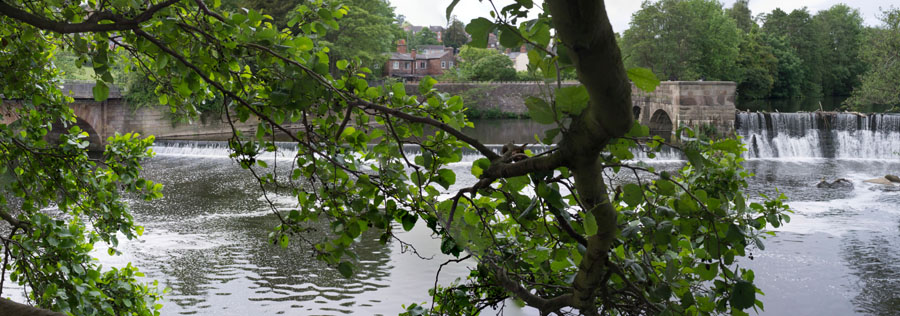
I took a couple with the camera of the Derwent by the East Mill in Belper the weekend before last. The first, produced from just 3 landscape exposures is a roughly 90 degree horizontal view, and the original file is 7281×2556 pixels. Taken under a tree there was little difficult in lining up the leaves, though I did need to make use of the PTGui masking facility to get a perfect result.

© 2011, Peter Marshall
Right Click and select ‘View Image’ for a larger image in Firefox*

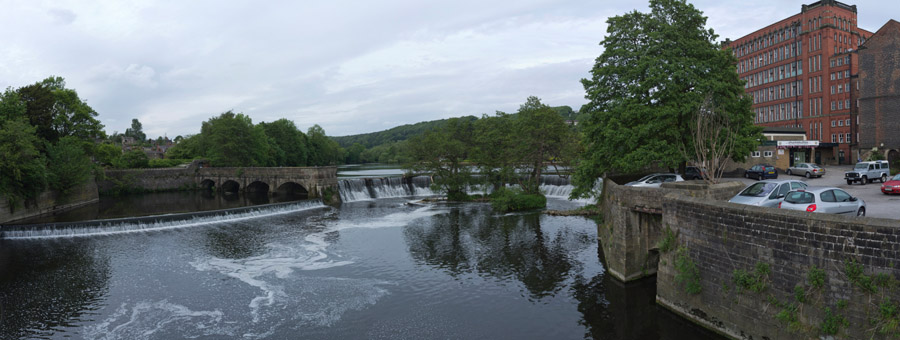
The larger pan, a 132.7Mb file, was made with the camera in portrait format, stitched from 6 frames to give a 137 degree view, 22,080 pixels by 4187. If I had a long enough sheet of paper, printing this at 300 dpi would give a six foot long print.

© 2011, Peter Marshall
Right Click and select ‘View Image’  for a larger image in Firefox*

The images were shot on RAW and those in each set were processed in Lightroom, adjusting one file and then ‘synching’ the settings to the rest in the set before adding some identical local brushing to the sky area across all of the images. Lightroom also applied a profile to them which reduces chromatic aberration and distortion, presumably making it easier for PTGui to stitch them together.  Later in the weekend I took a similar scene with a wider lens (20mm f2.8) using a Nikon D300. The wider angle of view was an advantage, but the FX100 was easier to use and the results seemed just a little better.

* In other browsers, if there is no way to see images at full size you may need to save the images to see them at larger size – they are 900px wide, twice the width they display on this page.