Slough Vaisakhi

The Gurdwara Sri Guru Singh Sabha in the north of Slough is around ten miles – an easy bike ride – from my home, though I always do an extra half mile or so. Slough isn’t a place a visit too frequently, and something about it means I always get lost, despite knowing exactly where I want to go.  Somehow, as usual, I end up in the middle of town on the wrong side of a wide road with a fence down the middle, and have to divert and cycle through a subway.

Fortunately I’d left home early, and arrived in plenty of time, well before much had started to happen. Photography often involves rather a lot of hanging around and waiting, because it isn’t much good arriving with your camera after things have happened – and the only time I’d come to Slough to photograph the Vaisakhi celebrations before I had been just a little late.

Being there early did give me the opportunity to go inside the Gurdwara and take a look around, and as well as taking a few pictures get to know my way around and talk to people.

© 2009 Peter Marshall.
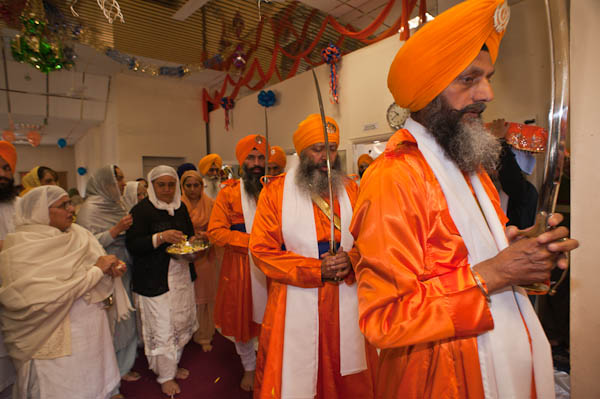
The Panj Piyare process from the prayer hall, swords raised

© 2009 Peter Marshall
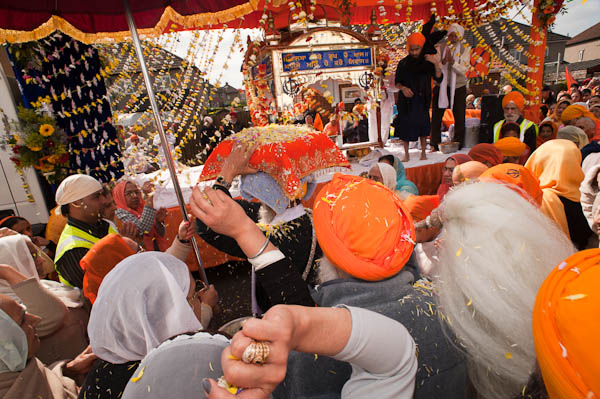
Women throw flower petals at the Guru Granth Sahib

I was at the top of the stairs when the procession came out of the prayer hall and made its way down and out to the crowds waiting below; all the time women were throwing flower petals over the Guru Granth Sahib and I joined them to take pictures from their viewpoint as the scriputres were carried to the waiting float.

© 2009 Peter Marshall.

Most of the pictures inside were taken with a 20mm lens on the Nikon D700, and this enabled me to work in rather crowded conditions. The 20mm is a nice compact lens too, and although in some ways I’d prefer a wide zoom, I’m getting to like working with a fixed lens again.

This was the first real set of pictures I’ve taken with the Nissin Di622 flash, and I was impressed. It just worked, and seemed to keep up rather better with my fairly rapid shooting than the SB800 generally does.  I simply put it on the hot shoe, flipped out the diffuser to cover the wide angle and shot in ‘P’ mode, moving from indoor exposures of 1/60 at f5.6 to outdoors at 1/250 at f18 (at ISO 400.)

I’d tried shooting inside with available light earlier, and at ISO 2000 could work at around f4 and 1/100, but the colour was poor with the fluorescent lighting. On the stairs light levels were higher with a large window adding daylight, but the mixed lighting seemed an added problem. So flash seemed the obvious choice, although I felt a little obtrusive using it. But my previous experience photographing at other Vaisakhi celebrations and a Sikh wedding was that this was unlikely to present a problem to those I was photographing. And I did really want it for those petals.

More pictures from the event – many of those outdoors taken with a Sigma 18-125mm on the D300 – on My London Diary. The Sigma – which I’ve had for a few years – seems more robust than the Nikon 18-200mm, and has similar image quality – very usable rather than really superb. It lacks the VR of the Nikon lens, but I seldom seem to see much benefit from this in practice – and certainly not on sunny days. I have less focus problems with the Sigma, and its one fault is that the zoom ring works in the wrong direction.

Working with two bodies again does make life easier in most ways – though I wish they were lighter and came with straps that could never get entangled!

Lightroom 2.3 running

As reported in my post Lightroom Recovers Again, I’ve been running the LR 2.3 release candidate since around the end of January. It solved the terrible memory leaks of LR 2.2 which caused crashes whenever you did much dodging and burning on images. This morning I downloaded the now released final version of LR2.3 – all 131Mb for the Windows version, so don’t try it on dial-up – and it’s now installed and up and running.

So far, fingers crossed, it seems identical to the release candidate and I’ve yet to find any problems. Lets hope Abobe have really got their act together now.

Also available for download is a Camera Raw 5.3 update for users of Adobe Photoshop CS4; Adobe Photoshop Elements 7.0 and Adobe Premiere Elements 7.0.  It’s of no use to me as I’m still using Photoshop 7 on those few occasions when I need to work with Photoshop.

There are very few things I need Photoshop for now with digital images, though it’s still essential for working with my scans from negatives and transparencies. But for digital files Lightroom has the convenience and speed of a ‘one-stop shop’.

Leica: A Small advance Advance for the M8

It’s good to know that Leica can sometimes change their mind and listen to customers, rather than keep on telling us that they know best. One of many complaints Leica M8 users have had is about shutter noise – and the M series was once legendary for its quietness. Many of us who sometimes like to work discretely were distinctly disappointed by the M8, which has a shutter that is intrusive in anything other than pretty noisy areas – and usually noticeable in street photography.

There was an expensive shutter upgrade to the M8-2 shutter on offer; it is a little quieter, but the depressed state of both my finances and the pound made the expense a step too far. You can listen to both the shutter sounds on the Leica site and decide if it really would have been worth the small fortune demanded

Another new feature of the M8-2 was the ability to separate the shutter firing from the re-cocking,  a ‘discreet’ mode that delayed the re-cocking while the shutter release was held down.  Leica decided not to make this available for M8 users, presumably hoping we would rush out and buy the M8-2! But instead users just went on complaining and eventually Leica have relented and made this facility available in updated firmware, available for download from today. It’s a small and very welcome step.

This still leaves one major and I think unnecessary inconvenience in using the camera for many of us (I could probably put up with what appears to be less accurate framing than the film models.) Leica’s range of wide-angle lenses, while excellent, are extremely expensive. Like many Leica users I’ve made extensive use of Voigtlander lenses, made by Cosina, which in some cases are around a tenth of the price and most of which give excellent results.

The M8 (and M8-2) has an inbuilt problem with its IR sensitivity due to the decision to use a very thin IR blocking filter. I first came across this photographing Muslim women in black burkhas and finding they came out in different shades of brown and purple. I wasn’t amused and it took hours of work in Photoshop to produce a usable file.

Leica – rather late in the day – admitted the problem and came out with a solution, supplying IR/UV blocking filters for the front of the lenses, but while this solved the colour issue, it introduced a new problem. Light from the corners of the frame goes through the filter more obliquely, thus taking a longer path through the filter and resulting in what they correctly describe as “annoying colour casts in the frame corners.” It is only noticeable when using lenses of 35mm (a standard lens on these 1.3x cameras) and below, and increases as you go to lower focal lengths.

Again Leica had its solution, detecting the focal length from coded dots on the back of the lens and allowing you to automatically apply a firmware correction in camera as the pictures are taken. Apparently it works fine with Leica coded lenses but leaves users of older non-coded Leica lenses and non-Leica lenses out in the cold. Leica will – at a price – add coding to some Leica lenses.

Those of us with lenses without coding can find independent engineers who will add coded read rings to some lenses or can try the do-it-yourself solution with a ‘Sharpie’ felt tip pen (tricky to do and although it can work, it soon wears off.)

More successful is removing the colour cast with the excellent and free Cornerfix software (for Mac and PC – the latest version 1.0.0.0 was updated January 5, 2009.) It works well, but it does add another level of processing and if you take more than a few images adds a level of time and hassle to your workflow you could do without.

While it would not be reasonable to expect Leica to come up with solutions for every lens you could possibly put on the camera, it would be a very usable solution if they allowed you to manually select from the Leica lenses covered by their coding (and thus by the firmware) so the camera would then apply a reasonably close correction.

Instead they simply recommend using coded lenses. A set that covers the same focal lengths and apertures as my existing Leica, Minolta and Voigtlander wide angles would – at current street prices – set me back around £8000.

D700 at ISO 3200

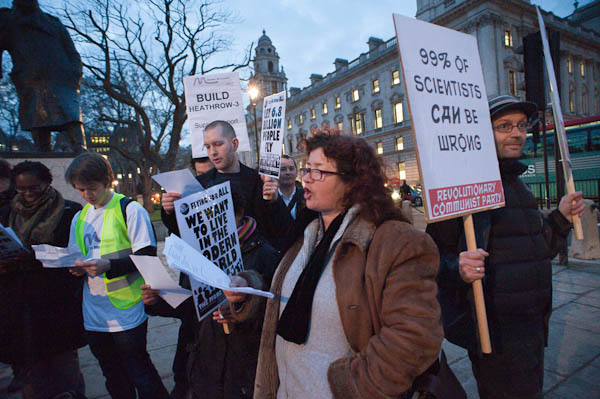
There were two demonstrations starting at 5.30 in Westminster, so it seemed a good occasion to try out the Nikon D700 at high ISO working with available light, though I also took some flash pictures with the D300.

© 2009 Peter Marshall.

As the light fell, I started working at ISO 2000, and this shot at 1/60, f4 with the Nikon 20mm f 2.8 is  very usable, although my normal Lightroom settings for noise reduction left a little colour noise on 1:1 viewing – easily removed by a small increase in the ‘Color’ setting from 11 to 15.  There was also visible luminance noise, improved slightly by increasing the setting for this, although it wasn’t possible to remove it completely.

Most frames taken at 3200 were actually a little cleaner, suggesting that despite shooting on RAW, in-camera noise reduction is kicking in more strongly. Although there is a little noise, the overall quality is remarkable, and these images are fully usable. I wouldn’t anticipate having any problems even with the occasionally rather pernickety quality control on sites such as Alamy.  The noise is actually quite attractive – rather like film grain – so long as you remove the colour component.

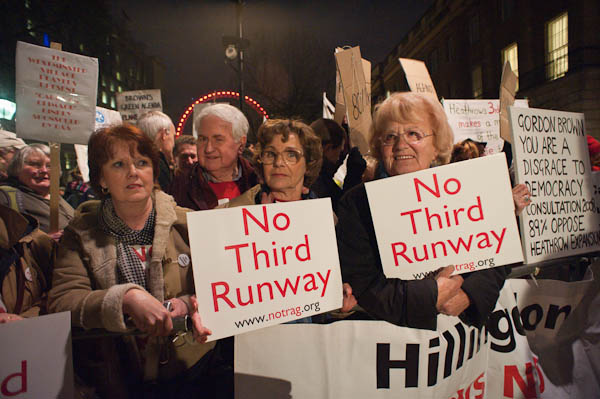
Here is a picture of two NOTRAG  supporters in Whitehall, taken at 18:15, 1/80 f4.5 ISO 3200, again with the 20mm.  In fact I suppose it is really at ISO 6400, as to keepthe highlights (except for actual light sources) I had to use a -1 EV exposure bias.

© 2009 Peter Marshall.

The main technical problem in this picture is not the camera but the colour and quality of the available light. Here’s a 1:1 section from the image

1:1 detail, ISO 3200
1:1 crop from ISO 3200 image on the D700

There is some noise visible, and a slight lack of detail compared with a low ISO picture, but overall the quality seems very usable. And in the city centre, ISO 3200 lets you shoot hand-held in available light, certainly with wide-angle lenses. Here are a few pictures I took later in the evening.

© 2009 Peter Marshall.

© 2009 Peter Marshall.

© 2009 Peter Marshall.

© 2009 Peter Marshall.

This last image shows what is now sadly the former Eurostar terminal at Waterloo (St Pancras may be fine for some, but the switch there and the huge sums spent on the high speed line from Kent to there have increased my journey times to Paris by on average 15 minutes.) And it’s a little of a cheat as a hand-held image because I was resting my hand holding the camera on a nice solid wall for the 1/6 second exposure.  But the roof detail is great at the left of the picture. Surprisingly for a 20mm image it seems not to have sufficient depth of field to retain sharpness to the end of the structure.  So a tripod would have been a good idea, allowing me to stop down and give a longer exposure, and doubtless the lens would also perform a little better stopped down. And it might even have been improved slightly by using a lower ISO.

Flash still has a big advantage in taking portraits in the street at night because of the poor colour spectrum of most street lighting, which makes it impossible to get normal skin tones.  But I can see that on the D700 I shall be shooting flash at higher ISO to, to retain more of the surroundings.

Aardenburg Imaging & Archives

Aardenburg Imaging & Archives (AI&I) was founded in 2007 by Mark McCormick-Goodhart, formerly Senior Research Photographic Scientist for the Smithsonian Institution in Washington DC and a founder of one of the first fully colour-managed digital fine art printing studios, and is housed in a fine nineteenth century house Lee, Massachusetts, USA. They are concerned with documenting digital printing technologies and a part of their programme is their innovative Digital Print Research Program

One point in my recent post How Long is a Hundred Years was about the limitations of the testing methods now accepted as a standard for ink jet prints, giving figures often called ‘Wilhelm years’ which are misleading, based on relatively high levels of fading or discolouration.

AI&I’s I* metric is an estimate of the light exposure in megalux hours before fading in a print becomes noticeable or the print shows physical damage. You can read more details about it on their web site, as well as seeing the ratings of some popular printer/ink/paper combinations.   The actual exposure neede to cause noticeable fading will actually depend on the subject matter of the print and the colours it contains, and I* (which I assume is pronounced I-star) is given as a range.

One of the higher published ratings so far is for the Epson 4800 using K3 Ultrachrome  inks on Epson Premium Glossy Photo Paper at 61-70+ Megalux hours, while Fujicolor Crystal Archive Paper Type II Lustre printed on a Fujifilm Frontier 390 runs in at around 16-20+ Megalux hours.

What this means in terms of years of course depends on the level of illumination used to display the prints.  In the explanatory pdf you can download from the AI&I site (go to ‘Accelerated Ageing Tests‘ then select Light Fade Test Results‘ and the link is above the results) it gives a simple conversion to ‘years on display‘ based on average light levels – simply divide the I* metric by 2.

Another AI&I programme of interest is ther real-world print monitoring  which involves studying the actual deterioration of prints under display conditions. Presumably this will enable them in the longer term to assess and refine the connection between the accelerated ageing tests and actual print performance. They also intend this year to set up archives, a gallery and printmaking services.

AI&I is an organisation you can join for an annual fee – $55 Amateur, $95 Professional and $295 Corporate.  Joining gets you access to their full set of test results and also entitles you to send in samples for testing to add to their database – which they intend to cover the widest possible range of materials.

Apart from the better basis of their methodology compared to current commercial services, the great thing about AI&I is the open nature of its testing, with all results being made available, rather than these being shrouded in commercial secrecy.  It very much seems to be a service aimed at the print-making community and I hope will attract widespread support.

How Long is a Hundred Years?

I did go into my darkroom last week, but only to start a job I’ve been putting off for 18 months, filing the last films that I developed. And while I was there I also tidied up the 50 or so films still waiting to be processed whenever I get round to it. So now I know there are exactly 27 36 exposure cassettes of TCN400, 15 of Fuji colour neg, 2 120 rolls of same and most intriguingly, 2 cassettes of T-Max 100.  Much of this was shot alongside digital when I wasn’t too sure I could get what I wanted from the digital – but found I could. But I’ve not the slightest idea what can be on that T-Max, and some day soon my curiosity will force me to dev it to find out.

Of course, any b/w liquid dev I still have lurking will by now be a murky brown, so I’ll either have to find a shop that still stocks such esoteric materials or get out the recipe book and those jars of “raw chemicals” stashed in a corner of my loft next to the antique chemical balance.

All of the rest needs C41 and just one of the things that puts me off processing it is wondering whether those colour chemicals I have are still OK to use – but of course the longer I wait the less likely they are to be usable.

It’s even longer than 18 months since I made a print in the darkroom. I first ordered Piezography inks from Jon Cone in Vermont in 2000 and was immediately hooked on the quality of output I could get on matte papers such as Hahnemuhle’s German Etching. It was platinum without the hassle, though not without some problems, most of which Cone solved for me with the introduction of his “new generation” Piezotone inks in 2002 – and as a beta tester for the icc profiles I made sure they worked perfectly on my Epson 1160 printer. So well that I’ve yet to move on to his even better Neutral K7 inks, and although the inks I’m using are well past their best before dates they still seem fine. And unlike some unlucky Epson owners I’ve never had problems with these inks clogging my print heads.

I’ve also been printing glossy black and white and colour using Epson Ultrachrome K3 inks (in an Epson R2400) and Epson’s ABW (Advanced Black and White printing) using papers such Permajet Fibre Base Gloss, which really does give prints that match darkroom output – and rather better than some modern papers. The increased control from digital printing is such an advantage with ‘difficult’ prints too. But something I read today makes me think I’ll have to change my ideas on this.

What started me thinking about this was a very long post by Jon Cone on the Yahoo Piezography3000 group (you will need to sign on with a Yahoo ID to read it), in which he discusses what is meant by a 100 year print – as based on the lifetimes that inkjet manufacturers such as HP, Epson and Canon quote, using the tests by Wilhelm Imaging Research (WIR.)

As Cone makes clear, WIR figures are based on an end point of “nearly 35% fade or discoloration” while much smaller differences of around 5% are actually visible.  He suggests the 35% level was set as something achievable with chemical colour prints over reasonable periods when Wilhelm started testing – at a time when we had just realised that they deteriorated greatly.  He writes: “I think most b&w photographers would be more than willing to have thrown [the print] away long before” that level is reached.  How long before is the real thing we need to know, and frankly we don’t have the information needed to even make a reasonable guess.

The industry standard also prevents manufacturers from releasing detailed test results – they can only state a figure in years and the light level of 450Lux 8 hours per day. Because of the way that the tests are commissioned and can be reported, inks that show a truly acceptable under 5% of fading in a 100 year test end up with the same rating as those that test close to the limit – at which level a print would have long been fit only for the bin.

So the answer to that vital question for a print with a ‘100 Year’ WIR rating could be almost anything. It could be as low as 25 years or as high as 250, and that 25 year possibility worries me (though it should worry younger photographers more.)  It would obviously be a help if the actual ‘100 Year’ terminal result – whether it was 2.8 or 28% fading – was published and we could then make up our mind, but I can’t help the conclusion that the way in which WIR results are published is calculated to benefit the manufacturers rather than provide useful information to photographers.

Cone continues to say that WIR has actually now stated that its predictions can no longer be relied on for inksets that produce b/w prints by combining black and colour inks – as in Epson’s ABW and prints made using Canon and HP ink sets. He also discusses the new i*metric proposed by WIR which is in public beta and gives an explanation of why this too fails to give satisfactory predictions.

Cone has published data  from many of his own tests on his own inks. In the post (and it is worth reading in full, as well as the discussion that follows) he discusses the fading of the current Piezography inks which he states are designed to fade less than 5% (ie below the visible level) under an illumination test of approximately 150 years at 450Lux 8 hours per day.

A further post by Cone in the thread (the latest as I write, but its a thread I’ll be following with interest) looks at the problems of the archival nature of paper and states that testing by WIR ignores this. He is currently carrying out tests on Epson K3 ABW versus Piezography K7 and PiezoTone which he started using Epson Velvet Fine Art paper. Epson describes this as:

  • Acid free base to preserve fine art and photos
  • 100% cotton rag for archivability

and they publish a Permanence rating from WIR of 61 years.

This figure is perhaps confirmed by Cone’s test, because he says that it “yellowed so bad after 60 years LUX I had to scrap it.”  He is now repeating the test but using Hahnemuhle Photo Rag paper.

My Conclusions

1. If you are a photographer selling prints, you need to be very careful in what you say about archival quality or lifetime of your prints. Most current claims are incorrect because the tests they are based on are not related to visual print quality.

2. If you are producing black and white prints you need to use specialist inks (such as Cone’s) and papers to produce prints with lifetimes comparable to traditional ‘archival’ silver prints.  If like me you want to use Epson’s Ultrachrome K3 inks for colour and also to make glossy black and white prints on the same printer, then you might be advised to look at printing methods that don’t use the colour inks as well. The K3 set includes black, light black and light light black and it is possible with third party software such as Quad Tone Rip or BowHaus’s IJM/OPC to print using just these.

3. If you are a museum which wants photographs as a long term record you should be concentrating on the archival storage of digital files as the primary record rather than prints on paper. (And of course it goes without saying that you also need to be aware of the problems of long-term digital storage – and their solutions.)

4. I dislike posts with titles that ask a question and then fail to give an answer, but really there isn’t one. If you use most inks and papers that are rated at ‘100 Years’ and keep them under reasonably sensible conditions – avoiding strong sources of UV or materials that give out gases such as rubber etc, then they will probably last without noticeable fading for at least 15 years. If you chose the right inks and paper, probably ten times that.

Lightroom Recovers Again

For those of us who shoot largish numbers of pictures with digital SLRs there are really two outstanding choices of software to handle your files, Adobe Lightroom and Apple Aperture. And if, like me, you prefer to use PC rather than Mac, that leaves Lightroom.

Using it, I can take pictures, download them to my PC, rename them, add that essential metadata including keywords, select the best images, add them to my searchable catalogue, adjust the tonal curve, exposure, contrast etc, get rid of chromatic aberration, cut down noise, apply sharpening and do all the really basic things that every image needs before outputting jpeg (or TIFF) files for all my specific uses (web, my clients, image libraries.)  Almost every step is speeded by appropriate presets which I’ve set up and most of the processing takes place in the background as I get on with working on further images.

With Lightroom 2.1 we got  some great tools for dodging and burning images, and as I wrote at the time,  Photoshop was hardly necessary for working with digital images except for a few essential third-party plugins, some of which can also work standalone or as plugins to cheaper  – or even free – image manipulation software.

I do have other software which can do a great job of converting RAW files to images. Phase One’s  Capture One 4 is an improvement on earlier versions, and Nikon’s own Capture NX (I only have Version 1.3.5) has the advantage of knowing more about Nikon files and a few nice touches. But frankly both are a pain to use and lack the superb workflow of Lightroom, as well as many of its features.

So Lightroom has become central to my current work. When LR 2.0 came out I loved the new tools, but was crippled by its slowness at importing files, making jobs that should take minutes into hours.  in the post Lightroom Repaired I rejoiced that the release candidate for 2.1 had solved the problem.

But a similar problem developed with LR 2.2; if, like me you began to make extensive use of the local adjustment tools you soon found that the program seized up, or crashed. There was a very obvious memory leak.

I’ve got used to having Windows Task Manager open and every ten or 20 images having to kill the Lightroom process. Each time it took perhaps a minute or so to get it up and running again and find the image I was working on, so it wasn’t the end of the world, but it was a major pain, especially as writing batches of jpegs to disk would also have the same effect. I could no longer leave the machine writing out a hundred or two files while I relaxed and had a meal.

So I’m very pleased to report that this particular bug has now been squashed in the release candidate for Lightroom 2.3, which I downloaded (133Mb) on Sunday; it has since behaved itself perfectly on my system.

Lightroom is I think a great program, one that is fast becoming a classic for photographers in the same way that Photoshop itself is for graphic designers (and we photographers used around 5% of it because that 5% was as good or better than anything else on the market.)  But I’m very worried about depending for a living on software that is clearly released without proper testing. Two recent major versions with such obvious bugs is more than unfortunate.

Thousands for the Obvious

I’ve seen plenty of bad videos.  Even watched French TV. But you if you’ve a really strong stomach you can see one of the worst camera tests ever from the Gadget show on Five TV.  The Online Photographer, where I found the link, calls it “Kind of long but good fun‘” but they obviously have a very different idea of fun to me. It’s bad, bad, bad. So bad that at times it’s laughable, but also so bad I can’t force myself to watch a second time.

A male presenter with an incredibly staring eye problem and an uncomfortable twitch and a patronisingly eager female, both blessed by bad script writers, dress up in Avengers leatherware and get themselves photographed in a studio on a Nikon D700 and a Nikon F5 using the same Nikon lens (the photographer gets into the spirit of the act later with a bad black cloth cap.) He works with ISO 400 film in the F5 (it seems a bad choice to me) and sets the D700 to ISO 400 too.

Then they get prints made the size of the side of a bus and have them erected on the rather boring exterior of a modern building in the centre of Birmingham, UK, then run along (yes, they do run) and look at them. What a surprise, the digital camera gives the better print.

Better colour, more details in black, less grain, greater clarity. Digital gives the far better result. Which has been pretty obvious to all of us who actually use digital cameras for several years now.

Tilt-Shift?

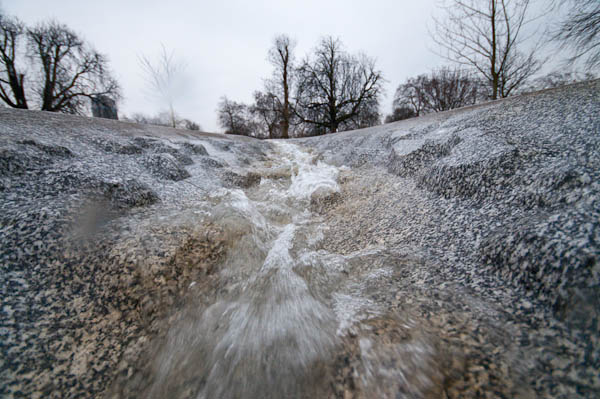
 Princess Diana fountain © 2008 Peter Marshall
Princess Diana Memorial Fountain, Hyde Park, London – more pictures

Tilt-Shift Maker  have got it all wrong. What I never wanted when I used a tilt-shift lens or the movements on a 4×5 was never to reduce the area of sharp focus, but always to get a greater apparent depth of field by tilting the plane of focus to cover the subject.


After extreme processing by Tilt-Shift Maker

So I don’t want this. What I’d like to see is that foreground area made sharp. Software that could do that would really be clever. Almost every time I go out to take pictures in winter or at night when light it low I find pictures where I can’t get the depth of field I want – and often a tilt lens could help. It isn’t often I want less depth of field – and when I do it generally isn’t just in the simple way that this program offers.

But if you are really looking for a new way to really mess up your photos and get some glowing comments on flickr, this is perhaps the way to go.

Lost Masterpieces?

Almost certainly not. But lost pictures, the ones that got away, are always so much bigger than those you bring to land.

Around 700 pictures lost in a moment not of carelessness but by accident. Yesterday I was covering the protests in London against the Israeli attacks that are killing so many in Gaza. At first things were fairly sedate, with a march to Trafalgar Square and a rally addressed mainly by the usual suspects. Afterwards opposite the Israeli Embassy in Kensington things began to hot up, and noticing I was close to filling an 8Gb CF card I took it out of the camera and put an empty card in, slipping the full card as usual into my ‘secure’ trouser pocket – one with a zip where I also keep wallet and credit cards.

© 2009, Peter Marshall
Riot police face the crowd after some of the barriers have been pushed down

Things did get a bit heated and at one point I heard my trousers rip, and glanced down to see a tear a couple of inches long. What I didn’t realise was that it had also torn some of the stitching of that secure pocket, leaving a gap more than large enough for a CF card to fall through.

It was noisy outside the embassy, with a police helicopter overhead and a near-riot on the street, so I didn’t hear the card fall through and on to the ground, probably when I rushed out to follow the police who were beginning to get seriously to grips with the protesters.

It was only on my way home waiting for a bus three-quarters of a mile away from the disruption that I put my hand into my pocket to look for my travel pass and found a large hole – and no CF card. I suppose it was fortunate that I hadn’t lost credit cards, wallet or ticket home, but I was really despondent to find my pictures had gone.

Even more annoying as I hadn’t really needed to take the card out of the camera when I did, because although I was right to think that things were going to happen, the police – perhaps understandably in the circumstances – stopped me from going to where I could take decent pictures.  Shortly after they cleared and sealed off the area where I probably lost the card, and there seemed no point in going back to look.

I didn’t even have my name and details on the card, which I do on some along with the message ‘Reward for return’ so I think short of some miracle I’m unlikely to see the pictures again.

Until now, I’ve relied on putting full cards in a safe place. Actually in what I thought was the safest place, that zipped pocket where I keep my cash and cards. It’s a system that’s worked without fail for seven years. But yesterday it let me down.

© 2009, Peter Marshall
Young Muslim women with faces painted to show support for the Palestinians in Gaza

I’d put a lot of effort into those pictures. Heavy stewarding made parts of the march hard to photograph, and I think I’d done a good job. At several times I’d been in interesting positions and photographed some great people and until I discovered my loss was feeling pretty good about the event. Losing perhaps four or five hours of my work isn’t really the end of the world but it felt close. And it leaves me with at least one rather tricky e-mail apology to write to one of the people I photographed and can’t send a picture.

© 2009, Peter Marshall
A conversation at the front of the march

To avoid any chance of this again I think I’ll buy a large enough card to hold a full day’s work – perhaps 16 Gb so I never need to change a card when I’m working. It’s something I couldn’t do a few years ago. And I’ll be sure to put my name and address on it so there will be some small chance of getting it back should I somehow lose it.

© 2009, Peter Marshall
Protesters carry a coffin to represent those killed in Gaza.

Actually I was lucky that I’d put two full cards into that pocket with a hole, and surprisingly the 4Gb one had stayed inside, with pictures from the start of the march. So at least I have something to use for the event.

© 2009, Peter Marshall
Young men call for an end to the holocaust in Gaza

And there are just a few more I’ll put on My London Diary shortly. 2009 is starting rather late there.