More from Paris

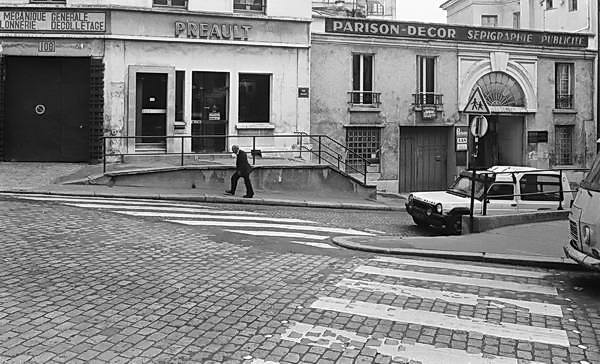
Paris 1984 © Peter Marshall

I’ve photographed this little crossing in the 10e – just along from the famous Hotel du Nord – many times and this is one of my favourite images. Last month when I stayed at home rather than going to Paris I got out some of those old negatives and scanned several hundred of them using the Epson V750.

The scans, despite what’s often said about flatbed scanners and 35mm film aren’t bad at all, and I could certainly make decent 10×8 prints from them, probably larger.  As a compromise I chose to scan at 2400 dpi. The scanner has a maximum optical 4800dpi, but at that resolution scan times get a little too long for volume production – roughly 4 times as long as with 2400. Of course I could have gone a little faster at a lower resolution, but given the time taken in removing and replacing the film from the filing sheets, putting them in the film holder, cleaning the negs and various glass surfaces  etc, the process as a whole wouldn’t be a lot faster.

Just for rough proofing of course you can scan  negatives still in their filing sheets – so long as you used the fairly clear transparent type, and its something I’ve done for making digital contact sheets. A normal full filing sheet doesn’t quite fit on the scanner bed, so you need to make two scans for each sheet – which I then usually join in Photoshop. Working at 600 dpi gives reasonably sized files where you can view individual images at roughly the size of an 8×10 print on screen, but aren’t too great for printing, though you can make postcard sized images.
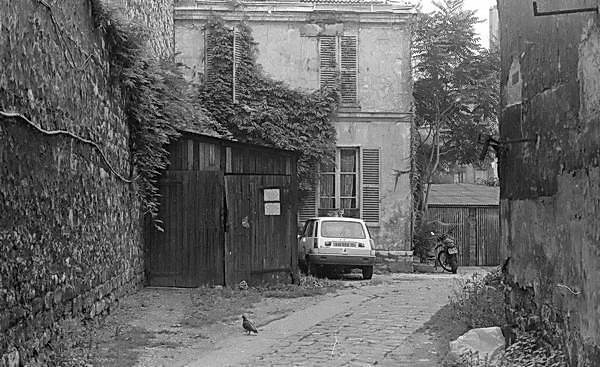
Paris 1984 © Peter Marshall
One of several ‘corners’ that Atget probably photographed

After a few experiments with the Epson software, I scanned the 35mm negs in 16 bit grayscale mode and saved them as TIF files. These are around 13Mb and roughly 3300×2050 pixels. I then made any basic corrections needed to the levels and/or curves as well as using the Polaroid dust removal filter and in a few cases a little bit of work with the clone tool, and saving them as 8bit gray scale jpeg files for use. Any I want to do much more work with I can start again with the TIF, archived on external storage. Although the files need some cleaning up if looked at 1:1, most are fine for use if reduced to web size, and I’ve now started to put some of them on line.
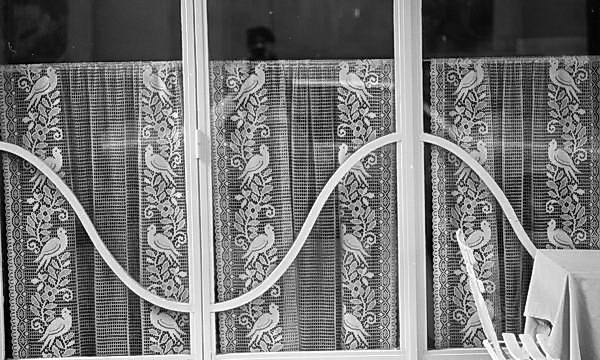
Paris 1984 © Peter Marshall
I think I took this a little straighter – and certainly printed it so

The main problem I’ve had with the scans is cropping. Although the Epson film holder can show more or less the whole negative, the automatic location of the images by Epson Scan seems to prefer a little cropping, especially with images where the edges of the negatives aren’t quite parallel to the edge of the film, which seems to be the case with quite a few of my negatives (I think it was a speciality of Leicas that it was easy to load the film slightly out, though working with M series cameras I never managed it quite as obvious as M Henri Cartier-Bresson occasionally did with the older models.
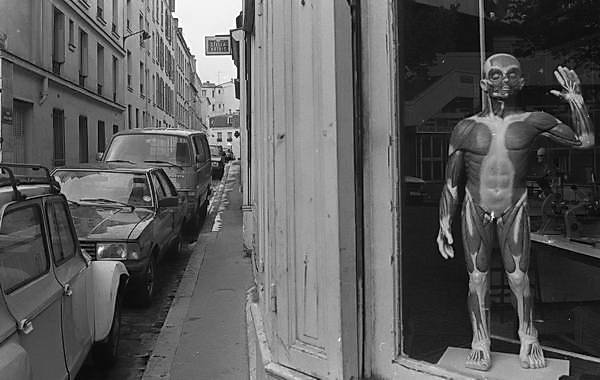
Paris 1984 © Peter Marshall

If I want to make new prints (and I hope some people may want to buy them) my first step would be to find the negatives and scan them at higher resolution in my dedicated film scanner, A Minolta Multiscan Pro. Especially when used with two devices made available by enthusiasts, this model produces some of the best possible film scans, as good and sometimes possibly better than drum scan.  Unfortunately the scanner is no longer available, but the idea of the Scanhancer, produced by Erik de Goederen from Holland, has been incorporated into some later scanner designs – though without acknowledgement. The other thing that improves the quality of the scans are some custom-designed and specially machined masks from another member of the user group, the MultiPro Xpander from Drazen Navratil in Zagreb. These hold the negs as flat as possible and the oversized 35mm mask allows the entire negative to be scanned. Altogether the Multipro group is a good example of how the Internet enables people from around the world to gain from each other’s ideas and experience.

Using the Epson V70 you can of course locate the negative edges more accurately manually, but it would slow down the whole process to a snail’s pace and isn’t really feasible when scanning several hundreds of negatives. I did recently get a mailing from Silverfast who claim that their latest software does the job better, but an upgrade to that supplied with the scanner was at a special offer price of 299 Euros, which I found not in the least attractive.  Of course I did install Silverfast when I bought the scanner, but soon decided I preferred to use the Epson software. Though some people do swear by Silverfast, I found myself more swearing at it.

So far I’ve put the first set of 28 black and white pictures from my visit to Paris in 1984 onto the web, where you can already see 45 of my colour images from the same year:
Paris 1984 © Peter Marshall

as well as more black and white work from 1973.  More from Paris later.

While thinking about Paris, I can’t help but think of some of my friends there who I missed seeing in November, among them Jim and Millie Casper.  The LensCulture web site has been running since 2004 , establishing an enviable reputation in the world of photography, and attracting around three or four times as many visitors a day as this site.

I’ve often linked to audio interviews and other features on Lens Culture from this site, and I’m happy to give another link to the site, this time to a request for donations to keep Lens Culture going.  Like these pages, it carries no advertising – as the site says:

Since our inception in 2004, Lens Culture has been completely self-funded, without revenue from advertising or any other outside source. We prefer to keep Lens Culture “content-rich and clutter-free”, and your contribution today will help it stay that way.
Lightroom – a New (Un)Twist

Although I use Adobe Lightroom for all my pictures and have on several occasions recommended it as doing 99% of what photographers need, there are some aspects of  it I’ve not found useful as well as pretty essential features I think are missing.

So I was very interested to read a blog post by Thomas Foster, Untwisted Adobe Camera Profiles. Foster is a recent convert to Lightroom from Aperture making the change for its better workflow with “Global presets (presets for just about everything for that matter), better selective editing (more like Capture NX2), better interaction with Photoshop, the ability to use Photoshop droplets in presets, and most of all Adobe Camera Profiles.”

However, like me,  he finds the results of the ‘Recovery’ slider disappointing. I’ve learnt to keep or return it to zero as a first stage in my development of any imag, as it has a flattening effect on the image highlights I find disappointing. Following that I use the selective editing tool to tone down just the out of range highlight areas, either by a simple ‘exposure’  painting – using a value of perhaps -20 and sometimes painting several times, or by using my special “highlight removal” preset  (Exposure -40, Brightness +20 or similar.)

Foster read an article by Chromasoft, Hue Twists in DNG Camera Profiles, which looks at the deliberate “twisting” in Adobe profiles that gives a slight shift in  tint with different intensities. The result of this is normally a more natural look, but it is one of the effects which can make the ‘Recovery’ tool give odd results.

Foster provides a link to a file containing “untwisted” profiles which will avoid this and gives instructions for installing these for the cameras that you use so they will be avaiilable in both Photshop and Lightroom. It’s simple, takes only a few minutes, and leaves the standard Adobe profiles intact. Once you have the untwisted profiles in place and have restarted Lightroom, you can then select the untwisted profiles when working with images by going to ‘Camera Calibration’ in the Develop module and selecting one of the “untwisted’ profiles.

I tired this out with the beta version of Lightroom 3, using some files with fairly challenging highlights, and it did make it much easier to deal with them, and I couldn’t see any problems caused either by the new profiles, though they do have a slightly unwelcome flattening on the lighter tones so  it’s still better where possible to use the standard profiles. These are however a very useful method when you need them.

Friday Zombies

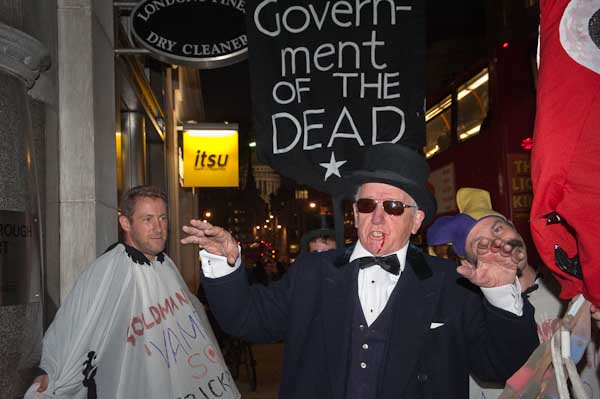
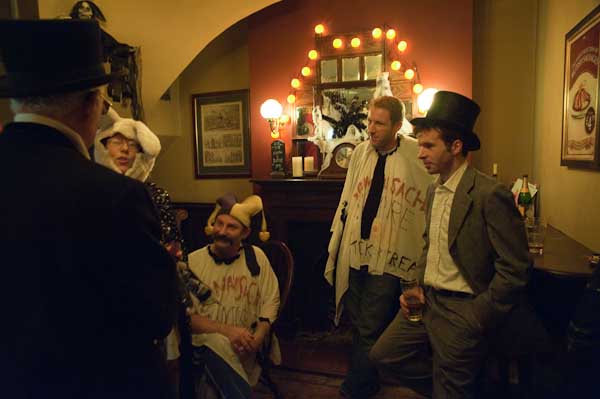
Since it was Halloween weekend, it wasn’t that surprising to have two zombie-themed protests on the streets. The first, by the ‘Government of the Dead’ led by Christ Knight was meant to catch bankers and other city workers going home, but work now seems to stop pretty early on Fridays, and the part of Fleet Street where Goldman Sachs have their office was dark and deserted by the time the small group of protesters arrived around 5.10pm.

Considering that the Facebook page for the ‘Goldman Sachs Giant Vampire Squid Trick or Treat‘ had 97 confirmed guests and 389 ‘Maybe’s, the actual attendance of six was rather disappointing. The idea for the event came from Matt Taibbi who wrote  in Rolling Stone and Goldman Sachs:
The world’s most powerful investment bank is a great vampire squid wrapped around the face of humanity, relentlessly jamming its blood funnel into anything that smells like money…

The group met in the Old Bell pub a few doors away, and lighting in there was low.  Using the D700 I was able to shoot by available light at around 1/8 or 1/10s at f5 – stopping down from f2.8 for more depth of field. At 24mm a reasonable proportion of images were reasonably sharp if I chose moments when people weren’t moving. I was shooting at IS03200, but at -1.33 eV, which I think means ISO 8000.

© 2009 Peter Marshall

Colour isn’t great, but that’s mainly down to the lighting, and viewed at 1:1 one of the guys has moved just a little too much, but otherwise sharpness is fine and my default (low) settings for noise reduction have done a pretty good job, though if I needed to I could improve on it.

Outside it was darker still, and flash was the only answer.  I should have switched to aperture priority perhaps working at around f5.6, but I left the camera on program and it chose f10. Which was fine for the flash but meant I picked up less than I would have liked from the ambient light even though I was working at ISO 3200 and 1/60 s.

© 2009 Peter Marshall

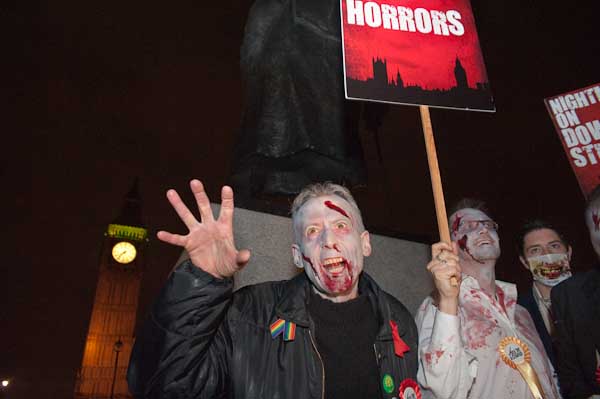
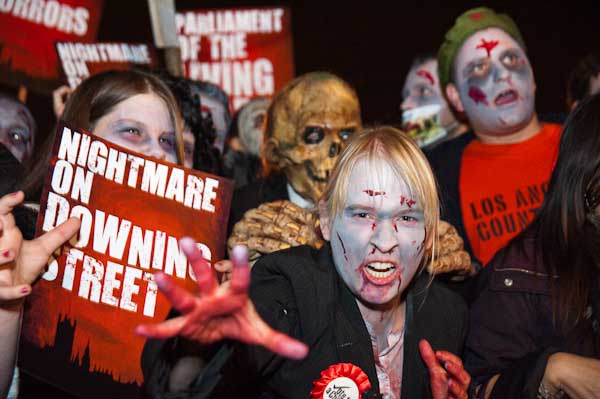
The second group of zombies were ‘The Parliament of the Dead’, protesting at the Houses of Parliament, calling for a referendum to create a fair voting system. There were certainly more of them.

© 2009 Peter Marshall

By now I had switched to aperture priority and was working at f5 (still at ISO 3200, 1/60) and Big Ben in the background was reasonably sharp when I was working at the wide-angle end, but perhaps got a bit too out-of-focus at the long end of the 24-70 zoom.

© 2009 Peter Marshall.

The floodlighting on Big Ben is just a little too weak for it to really stand out against the night sky, though perhaps an extra stop – working at 1/30 rather than 1/60 would have helped.

Some of the pictures aren’t bad, but I didn’t feel anything I took quite gelled. Perhaps there were too many rather similar zombies, and too many mainly amateur photographers getting in the way.

You can see more pictures of both Goldman Sachs and The Parliament of the Dead as usual on My London Diary, along with more details about the two protests.

Catching up – Afghanistan

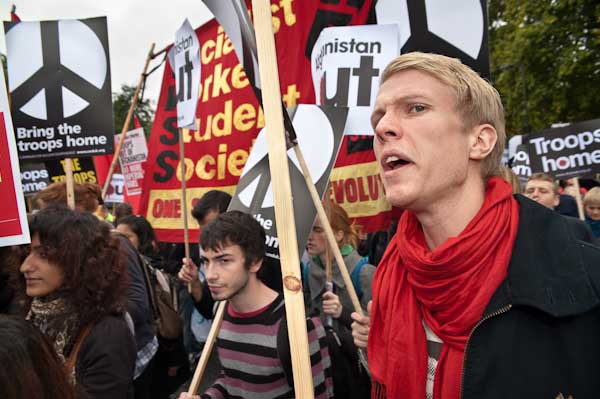
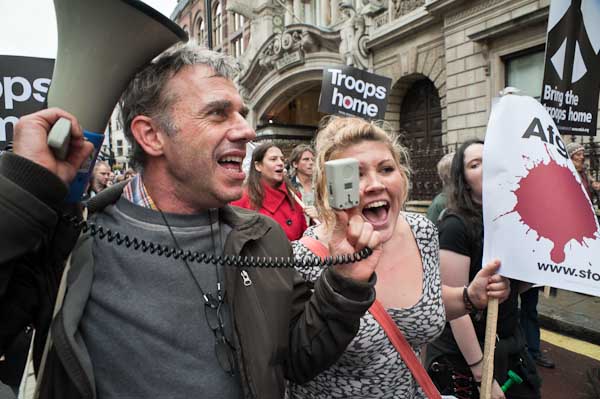
I’ve had a busy couple of weeks and there are quite a few events I’ve photographed and not mentioned here, starting with the march calling for troops to be brought back from Afghanistan. Given the strength of public opinion in support of this it’s perhaps surprising that there weren’t more than the respectable 10,000 or so taking part, but perhaps it reflects the very different reasons some have for calling an end to this war which is seems we can only lose, and which is killing more and more British soldiers.

Certainly not everyone opposed to it would want to march with Stop the War, CND and the BMI who were the organisers of this march. We are also just seeing the start of mainstream politicians beginning to say what the left has been saying for a long time; I’m rather surprised that the liberal democrats haven’t already come out firmly against the war.

Photographically the main problem was the weather, a dull day, very dull at times, and with the occasional little burst of rain.  Fortunately the D700 is pretty well noise free at ISO 800, and that was fast enough to work at a decent shutter speed with apertures around f4-f5.6. Most of the time I was shooting on the Sigma 24-70 f2.8, and I like to avoid full aperture whenever I can; it’s usable, but definitely a little soft compared to f4. After that, stopping down is only really needed to get more depth of field, particularly at the longer end of the lens.

I took some pictures without flash, but some of them look a little colourless, almost drained. Flash does tend to add a little warmth and colour under lighting conditions such as this though I was generally keeping the amount pretty low.

Here’s a picture that shows this and that I like:

© 2009 Peter Marshall.
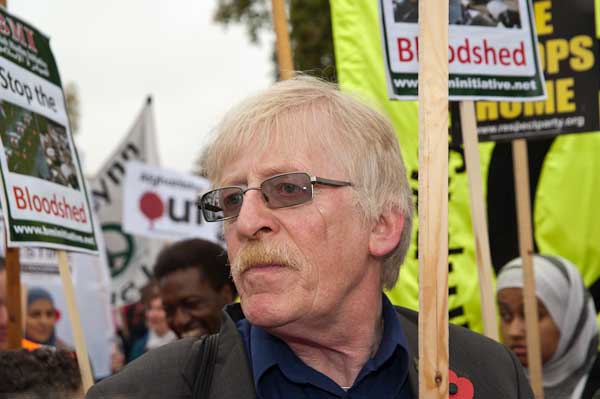
Peter Brierley who told Tony Blair “you have my son’s blood on your hands.”

The stewards were holding us a short distance back and there was a very tight scrum of press and others in the minutes before the march started. Quite a few pictures I took – even like this one at 1/250 – have camera shake because other photographers were pushing me from all sides. The len was at 65mm and aperture f8  and for some reason I was using spot metering – which is really better when you have plenty of time and can think what you are doing.  I was pleased to have two posters with the word’Bloodshed’ on them in shot.

I stood close to the start and watched most of the march go by, photographing close in and using the full range of the zoom. It’s an interesting exercise in thinking and working fast to try and frame compositions as people walk by and also enabled me to spot a few people and groups to photograph later.

© 2009 Peter Marshall

This was one I liked, and again the flash livens it up a little (24mm, 1/250 f7.1) and enables me a lot more freedom when I come to develop the image in Lightroom – where I could choose to ‘burn in’ the figure at the right to the exact tone I want (perhaps just a little darker than above.)

Here’s one I took later on the march without flash, and although I think it’s a good image, I just can’t get the same kind of colour quality.

© 2009 Peter Marshall.

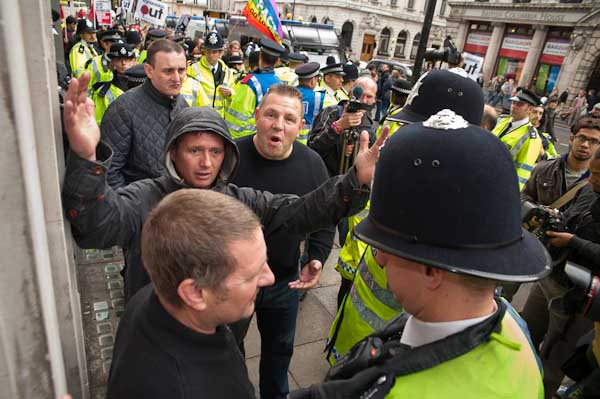
For once I walked the whole distance – which actually means I walked it several times, going back and forth taking pictures. And I took quite a few pictures of both audience and speakers in Trafalgar Square. But suddenly there was a disturbance at the back of the square, and several of us rushed out from the press area at the front of the plinth to cover it. Four Leeds supporters, in London for a match at Millwall had decided to heckle and insult the speakers, and the crowd had taken it badly, calling them racists and chasing them out. They were rescued and escorted by a largish group of police and it wasn’t easy to get clear pictures. As usual the answer was to think ahead and I was lucky when they stopped at exactly the right spot where I had chosen to stand on a ledge a couple of feet high and could look down on the scene.

© 2009 Peter Marshall.

Overall I was for once quite please with my afternoon’s work. No major disasters and quite a few pretty decent pictures. You can make up your own mind about them on My London Diary.

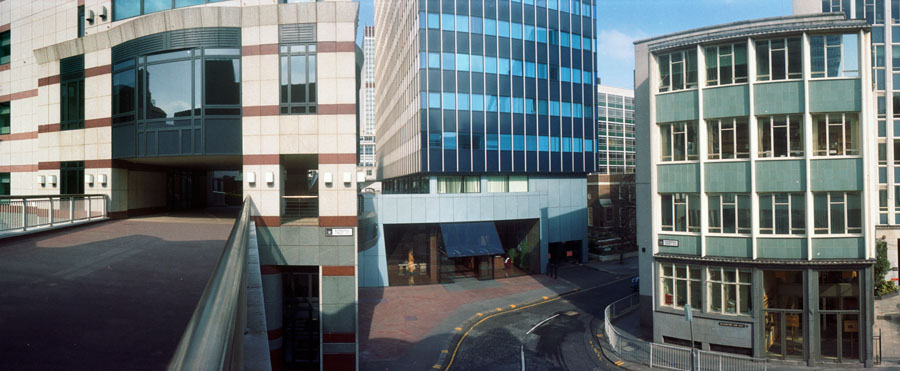
City Panoramic

I’m not quite sure what happened to me in March 2008, because I lost a web site. It was only quite a small site, with a dozen or so pictures, but I wrote it and then just forgot about it. Completely.

This morning by chance looking for another set of files I came across the folder it was in, though from the name it wasn’t obvious, but curiosity made me take a quick look and see a list of files mainly starting with 92-city, which meant nothing to me, so I double-clicked on the default.html file with them and got a surprise.

© 1992, Peter Marshall

It says on the site:

These pictures were taken when I was a part of London Documentary Photographers in 1992 and were a part of a documentary project on the City of London. The ‘square mile‘ is one of the major financial centres of the world. These images were first shown at the Museum of London in 1992.

I think I was probably intending to put together a larger site including many more of my panoramic images, but since that’s unlikely to happen in the near future I decided to link them in to one of my existing sites, The Buildings of London, which is long overdue for a makeover. But you can jump directly to them here, though you may need to make your browser window wider; the images on the site are exactly twice the width of the one in this blog at 900 pixels and the site was written to fit a page around a thousand pixels or wider.

All of these images were taken on a panoramic camera with a lens that rotates through around 120 degrees during the exposure. At the time I was using a Japanese Widelux camera, but later I preferred the much cheaper Ukranian Horizon which has a considerably better viewfinder.

Although the Widelux does have a viewfinder, the most accurate indication of what you are going to take is provided by a couple of arrows on the top plate. For best results, at least with architectural subjects, you needed a tripod and a good spirit level, while the Horizon was easily usable hand-held and had a level visible in the viewfinder.

There are several different models of Horizon, but all except the oldest, which had a metal body share a similar rounded plastic body. It would be great to have a digital camera that worked in the same way, but I think very unlikely that making one would ever be financially viable. So if you want to do this kind of photography the Horizon is still a good choice, despite being clockwork and using film.

My second Horizon came direct from the Ukraine in a brown-paper parcel and was cheap -under half the price the similarly specified Horizon Perfekt sells for at Lomography. But their price does include “a 2-year warranty against manufacturer defects, a premium case, and a gorgeous panoramic book.”

You can of course take panoramas using digital cameras and image stitching, but the results have a different perspective and it can be tricky if part of your subject is moving. Another approach that gives something rather more similar to the swing-lens result is to use a semi-fisheye lens and then remap the image using a Photoshop filter such as Image Trend‘s Fisheye Hemi. You can also get some different but also interesting results with remapping using the free Panorama Tools.

You can see an interesting discussion by the author of Panorama Tools, Helmut Dersch, comparing rectilinear, fisheye and swing lens results.

Lightroom 2.5

There don’t appear to be any great differences in the latest release of Lightroom,  available for download as a free upgrade for existing users. And although I took the usual precaution of backing up my Lightroom catalogue (which takes ages) the actual install was pretty fast and trouble-free and so far I’ve experienced no problems.

A few things do seem to be working a little more smoothly and I suspect there have been a number of minor bug-fixes and some tidying up of code. And of course there will be a  number of people with shiny new cameras who will be pleased that these are now supported by the new version.

I’ve finally got round to buying a book on Lightroom, and Seth Resnick’s “The Photoshop Lightroom Workbook: Workflow not Workslow in Lightroom 2” seems to be very good, unlike some other volumes I’ve seen. Lots of good common sense suggestions about using the software and the settings to choose, most of which are similar to what I currently do, but even though I’ve not yet really had time to sit down and make use of it I’ve already picked up a few good hints.

It’s very good for example at reminding you of the useful keyboard hints, that are easy to forget. So in the Develop module, hitting G takes you back to the Library module in Grid mode, and Shift/Tab gets rid of the clutter (or F toggles full-screen.)

I’m sure there will be some things I prefer to do my own way, but this seems really to be a real practical photographers guide while some of the others are definitely more for geeks who like fiddling with software. At £15 (-1p) from Amazon I think it’s well worth it – and I just need the time to go into it in more depth. And I really must get my keywords organised better as it suggests.

It’s only slight fault is that it assumes you have a Mac and although it often gives instructions for PC (and where necessary notes Vista and XP differences)  you do sometimes have to do a little translation for yourself. Of course there are some photographers for whom this will be an advantage. I’ve just looked at the reader reviews on Amazon when I searched for the link above – and one does mention this, and a certain Canon bias – which so far I’ve not really noticed, but all three give it five stars and so far I’d agree.

To Flash or Not to Flash…

That is often the question for photographers.  And last Thursday evening I wasn’t sure whether to shoot with flash or without. But in the end I turned on the SB800, set it to my usual-2/3 stop and got on with it.

It was pretty dim light, but the D700 can cope with that, giving fine results even at ISO 3200 if you get the exposure right. It was also raining, and  and that can certainly be a problem with flash in several ways. More equipment to keep wiping dry, but you can get also odd effects from the flash illuminating rain drops. There were half a dozen other photographers taking pictures and none were using flash – I seemed to be the odd one out. It didn’t worry me – I’m rather used to that, but I was a little surprised.

I’ve just checked up on the EXIF data in the files – always a better bet than my memory – and find I was shooting at ISO 1250 most of the time. The pictures with flash were at 1/60 f8, while a few without were at 1/160 f4.5, which are more or less equivalent apertures. Both were made with a -1 stop exposure adjustment as otherwise the sky was excessively burnt out when it was in frame.

I was using iTTL balanced fill-flash which automatically adjusts the flash to give a balance with the ambient lighting. The 1/60 speed with flash appears to be a result of using P mode and setting the custom setting e2 for the slowest flash sync speed to the default value (1/60.)  With flash, I like the effect of a little shake on the ambient part of the exposure – which at 1/60 you certainly get if the subject makes a gesture.

For the non-flash exposures I’d chosen a minimum shutter speed of 1/160 as I was working with a 24-70mm lens, and although I could work at 1/125 or even 1/60, the faster speed more or less eliminates the chance of camera shake. With the high ISO and a fast f2.8 lens there is seldom a need to use slow shutter speeds in any case. The lens, a fairly new Sigma HSM f2.8 24-70mm, is sharp enough wide open for most purposes, but stopping down to around f4 does sharpen it a little. You only need to stop down further if you need the depth of field.

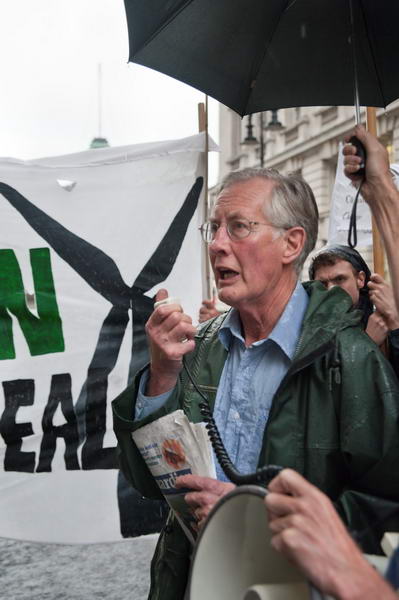
Of course I didn’t spend a long time working things out, just took a test frame with and without flash and then decided I’d use flash. Later, while I was photographing Michael Meacher MP  more or less head on, his glasses were giving some annoying reflections, so I turned the flash off for a few frames.

© 2009 Peter Marshall
Michael Meacher MP calls for action to save Vestas jobs – No flash

But then I moved around to one side and took a frame without flash before remembering to turn it back on. The result isn’t bad – though it took quite a lot of work in Lightroom to get it like this.

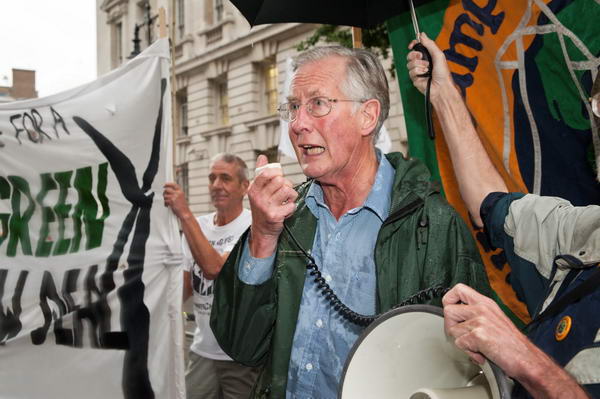
Below is an picture taken using the flash, which was rather easier to sort out in Lightroom, although I’ve perhaps dramatised it a little too much.

© 2009 Peter Marshall.
Michael Meacher MP calls for action to save Vestas jobs – With flash

As well as added flash, this image also has added water, a drop on the very large filter on the front of this lens which gives a slight smearing to the letters on the banner. You can also see the greater depth of field in the foreground hand – Phil Thornhill of the Campaign Against Climate Change holding the  megaphone – both were taken with focal length of 40mm. It’s perhaps a matter of taste which is better, though I prefer the flash version.

Of course what is important is what Meacher and the other speakers were talking about – supporting the Vestas workers in their fight for jobs. You can see more pictures – almost all taken using flash  – and read more about the event on My London Diary.

Photo-Op Impossible

I’m not a fan of ‘photo-ops’, arranged scenes set up for the press to take photos. Of course in a sense almost all the events and protests I photograph are arranged, and often very much with the possibility of press coverage in mind, though sometimes – for example too often with Stop the War events – you find the stewards do their best to frustrate photographers trying to get good pictures. So much so that I remember one time where we all sat down with our cameras on the tarmac in front of a march going down Park Lane.

But photo-ops are well meaning attempts to present what the organisers think will make a good picture.  Usually the problem is that they are just boring, and also many of us like to have a little more chaos and show things how they are.  Of course some of the press photographers are very much to blame – they like having things made easy for them.

There are photographers working for newspapers who like to set everything up. My heart sinks when one such decides to take charge of an event and to “set things up so we can get some good pictures” and procedes to get in the way of all of us and produce some massive cliche.  Of course sometimes you can still continue to take pictures, ignoring their concept and perhaps concentrating on smaller parts of the subject. He may want a wooden image of all 27 bishops present but you can still photograph the one who  is telling his neighbour a risque joke – and the reaction it causes – even bishops don’t respond too well to herding.

Another hate of mine is “Lets all move back boys, and we can all get a good picture”, usually coming from someone who saw a picture opportunity too late to get there. Or perhaps just can’t be bothered to change to a wide-angle lens. It’s always said when if anything I’d like to get in closer. You can be too close to people when photographing them – and when the only possible lens to use is a fisheye you probably are, though I do like my full-frame (on the D300) fisheye.

Yesterday,  a demonstration outside the Ministry of Energy & Climate Change  (from both title and policies its hard to tell whether they are for or against it) came one of those almost impossible to photograph ideas, with protesters getting down on the roadway to try to spell out the words

SAVE
VESTAS

with their bodies. It was a scene that demanded to be photographed from around 100 ft above, and my feet were firmly on earth.

[Vestas Blades UK  are the only UK manufacturers of wind turbine blades whose owners want to move production to the USA to take advantage of government funding available there – no connection with matches or curries.]

They made quite a wide target, and even with a 12mm ultrawide on the D300 I had to stand well back to get the whole message in.  Although it was obviously hopeless I took a few frames, though with a less wide lens to minimise distortion.

© 2009 Peter Marshall.

Then I switched to the 10.5mm fisheye and moved in close to the people on the ground. With its 180 degree diagonal view (and 147 degrees horizontal) getting everyone in wasn’t a problem. I got as high as I possibly could by a ‘Hail Mary’, holding the camera at arms length above my head and pointing it down towards them. It still wasn’t high enough, but the best I could do. I could perhaps have gone in a little closer, but I knew that I might need plenty of subject matter around the central scene for the later work.

© 2009 Peter Marshall.

Then at home it was time for Photoshop, and some perspective correction and cropping and more. I spent far too long trying out various approaches that gave results like this.

© 2009 Peter Marshall.

Not a great result, but I think the best I could do in the situation.

More about the actual event on My London Diary shortly.

Black Friday – Still Catching Up

Last Friday was Black Friday here. Literally in that around 10am when I was getting down to work on my computer, the screen suddenly went black and the system started to reboot.  My hope were raised as Windows loaded again, but dashed a few seconds later when I got the message “Windows has recovered from a serious fault” and then everything went black again – and this time the computer didn’t reboot.

I used to work a lot with computers and have often fixed other peoples, but this had me beat. I couldn’t persuade the system to boot from a CD, and nothing looked obviously wrong when I opened up the box, though it was very dusty!

I unplugged the inessentials and tried again with no luck, and eventually I gave up, sulked for a bit, then called out a repair service. They told me an engineer could come in around 4 hours, though after4 hours they phoned to revise that to 6.  I’d hoped to go out and take pictures but instead found myself staying in for the call.

The good news was that he eventually got it going. The bad news that it took him an hour and a half at expensive rates, and that he couldn’t really identify the fault.  Removing the memory then replacing just one of the four memory modules brought it back to life, but it continued to work when all four were replaced, and all passed the memory tests on his diagnostic software.  Perhaps it was just a poor or corroded contact, possibly on the memory but perhaps somewhere else on the motherboard, disturbed by the pressure on removing and replacing memory. Perhaps a short circuit somewhere broken.

So I now am considerably poorer, have lost a day’s work on the computer and half a day’s photography and have a computer with a doubtful motherboard. It could well go again any time, though at least I can now do everything that worked for that engineer without having to pay anyone else!

If there is plus point it’s that it’s made me think more carefully about what I can do to save things if the system does go again. While waiting for the repairman I set up email on another computer, and checked that I had all my essential files backed up on an external hard disk (most of them were there.)  I also installed a copy of the free Raw Therapee v2.4 conversion software – it’s an old computer that isn’t powerful enough for Lightroom or recent versions of Capture One Pro, and none of the software already on it could read D300 or D700 files.

Raw Therapee does seem to produce decent results, but trying it out in case I needed to process the job I had booked in for the following day I was soon very aware why I use Lightroom. And very relieved that the computer was up and running when I needed it.

Firstly, workflow and in particular the much better design of the interface. Raw Therapee seems too much of a community effort, with everyone wanting their own particular bell or whistle included, rather than picking the best approach.

Then I’ve become entirely addicted to the various possibilities of Lightroom’s ‘Adjustment Brush’ – allowing local adjustment of exposure, brightness, contrast, saturation, clarity and colour – in any combination. Being able to define presets for particular purposes is extremely helpful – I’ve got one called ‘Remove Highlights’ and another called ‘Spotoff’ – which works well together with the supplied preset ‘Soften Skin’.

And finally the whole output side  is easier to use – and I’ve set up all the presets that I need for different purposes.

I haven’t quite managed to catch up with what I missed, and haven’t quite decided what to do about the computer. The serviceman suggested it was probably time to think about a new one as it’s hardly worth replacing motherboards these days and systems are now so cheap. But it seems so wasteful.

And of course I’ve been checking my backups, although I lost none of the files on my hard disk – except for the anti-virus that was corrupted and had to be removed and re-installed. But today I’ve been busy writing out more of my images on to DVD.

DVD may not be good for long term storage, but there is something satisfying about a box full of disks that you can take out and put into almost any computer. Of course I also have the files on removable hard disks, the latest a 1 Tb Toshiba USB 2.0 model that cost me under £70 (now £75) and will store around 80,000 NEF RAW files. I’m happier with belt and braces.

Although digital photography has many advantages – and I often mention some of them – it has made us entirely reliant on computers. If you’ve not thought about what would happen if your computer suddenly stopped working, now would be a good time to do so.

Pride 2009 – and nearly a fall

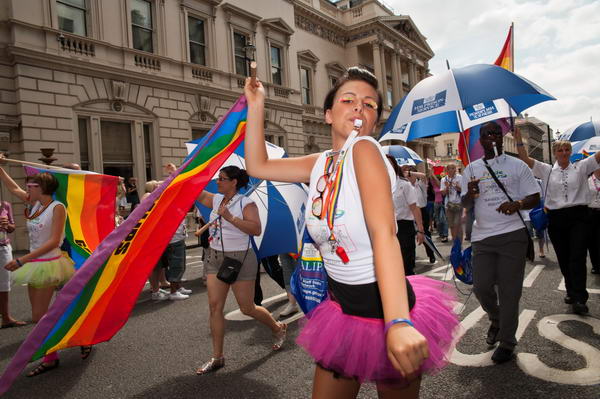
I failed to photograph the only slogan I saw at Pride that made me laugh or at least smile; one of those times when you see something and for some reason don’t photograph it, intending to do so later. But later seldom happens.

So I didn’t get a picture. But it doesn’t really need a picture – and probably why I didn’t photograph it was that it didn’t make a good picture. “ASEXUALS don’t give a F**K” amused  me, but not visually.

© 2009 Peter Marshall.
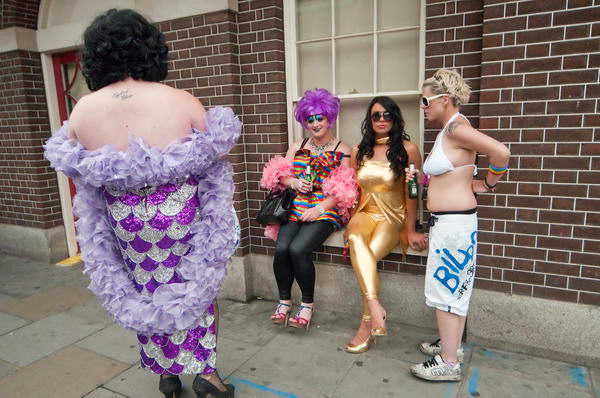
HM Prison Service: “Banged to Rights”

Fortunately quite a lot did visually appeal, and I took rather a lot of pictures, and despite a few technical problems quite a lot of them came out. Enough certainly to make editing a real pain.

It had been a good night on Friday, and I probably still wasn’t fit to drive a camera – fortunately they can’t breathalyse you for it. For some reason I left the D300 on a high ISO setting for an hour or so while taking pictures, though fortunately I managed to set the D700 to something sensible. Working with two bodies, I had a Sigma 12-24 (equiv 18-36mm) – just back from repair – on the D300 and another Sigma, the 24-70 HSM on the D700. So for that time the wide-angle shots were taken at silly settings like ISO 3200.

© 2009 Peter Marshall
For mysterious reasons this was taken at ISO 2500

The results were noticeably more noisy than I’d like. With the D300, I’m fairly happy working at ISO 1600 if I have to, but try to avoid anything faster. For the first time in a year or so I found the noise reduction built into Lightroom wasn’t enough and had to turn to specialist noise reduction software.

There are I think several programs worth considering to reduce noise, and when I used to seriously review software I was given free licences for all of them. But two years ago I moved to a new PC, and could no longer get them to work. Fortunately that old PC still works, and I switched it on for the first time this year to process these images.

The 3 programs that I recommended after my tests – and still recommend – are Imagenomic Noiseware Pro, Neat Image Pro and Noise Ninja, all capable of excellent results. For these pictures I actually used Noiseware, but either of the others would have given similar results.  You can actually download a free ‘Noiseware Community Edition’ for non-commercial use, which gives similar results although a few options are disabled. Its main limitation – at least if you only want to work with jpegs – seems to be that it is a standalone programme rather than a Photoshop plugin.

I sent a disk of mixed files taken at normal and high ISO to a library the day after Pride (I’d already e-mailed a few) and viewing them on my 21″ screen at 15″ wide the difference in quality is only noticeable on close inspection. At 1:1 it’s a little more obvious, but not greatly so. There is just a slight difference in colour quality that I think you can see even in the web files – more pictures on My London Diary – but frankly it’s still so much better than we would have thought possible just a few years ago.

Last year I wrote very little about Pride, but of course did take pictures I did give some links to some work from earlier years.