1200 Naked Cyclists

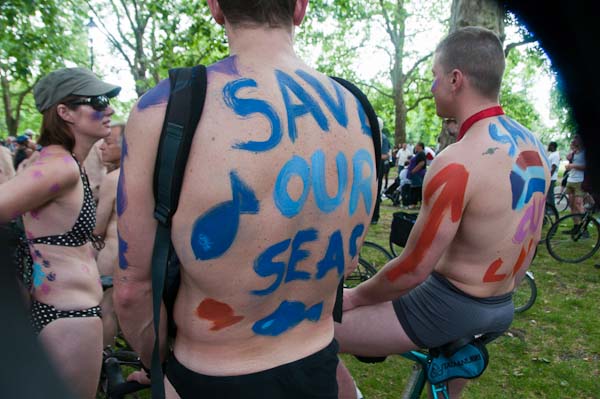
The World Naked Bike Ride is in several ways an interesting event, and certainly causes quite a stir as it goes through London, Passing as it does through major tourist traps including Piccadilly Circus, Trafalgar Square, Parliament Square and Oxford St, guarantees it a huge audience, and almost all of those seem to be holding cameras and camera phones.

Most of those taking part also seem to be taking photos – often even when cycling around, which can be rather tricky, but certainly at the numerous pauses on the 10km route. There’s even a Flickr pool for images, with around 700 online when I looked, mainly taken by riders.

The World Naked Bike Ride is a high profile public event in a very public place – and nobody can have any expectation of privacy.  Everyone taking part knows they will be photographed and most seem pretty happy about it.  Many smiled and waved as I took their pictures (including some who know me, but many more who don’t) and a few quite clearly tried to attract my attention.

– – –

Perhaps the most surprising aspect of the whole ride was the notice that one cyclist chose to carry on his bicycle:

© 2009 Peter Marshall.

It reads:’This photo was taken without permission.’ Well of course, as no permission was needed  – either to take it or to publish it as news, nor was it feasible to ask for permission at the time.  And so far as the law is concerned, as I mentioned recently,  wityh regard to the European Convention on Human Rights, “It is no surprise that the mere taking of someone’s photograph in a public street has been consistently held to be no interference with privacy.

What is even more ridiculous is that the gentleman in the picture – actually a crop of around 1/8 of the full image – is actually apparently taking pictures himself, in circumstances where it would clearly be impossible for him to have the permission of all those who are in his pictures.

– – –

It’s perhaps a pity the the WNBR seems overall a little  confused as to what it is about, and certainly those watching find it hard to understand. I’ve written in earlier years that it it would be better to have more clarity, and in particular to make it much more clearly an environmental rather than a naturist event.  It would be good to see everyone taking part carrying a relevant message on their bike or person.

© 2009 Peter Marshall.

And yet again I have to ask why can’t Nikon make a decent lens hood, with a bayonet fitting that isn’t easily knocked out of place?  I didn’t take many pictures before I noticed, but one is too many. I’ve just bought another Sigma lens, the new 24-70 mm f2.8, for use with the full-frame D700, and the lens hood – like that on other Sigma lenses – is so much firmer and more firmly fixed. Most days when I’m out using the Nikon 18-200 I’ll have to pick it up at least once from the ground after it’s been knocked off the lens.

More on the new Sigma 24-70 mm f2.8, when I’ve used it in anger a few times. But it certainly impresses in feeling solid and well built. As you might expect it isn’t a light lens, but shorter and lighter than the major competition (not that I could use the Canon in any case.)

Canon  83.2mm x 123.5mm, 950g
Nikon 83 x 133 mm, 900g
Sigma 88.6mm X 94.7mm, 790g

Most modern lenses can of course perform at the highest level, giving results that will satisfy practical photographic needs. Mostly any differences only become noticeable when photographing test charts!

More pictures from the World Naked Bike Ride in London on My London Diary, where there is the obvious warning – don’t click on the link if pictures of naked men and women might offend you.

Ancient & Modern – Cleaners Call for Justice

Part of the fascination of the City of London is its curious mix of ancient and modern. You see it every direction you look. Even the Druids who I’d photographed earlier celebrating their ancient traditions, were wearing trainers on their feet and one had not switched off a mobile phone which rang halfway through the event.

© 2009 Peter Marshall.

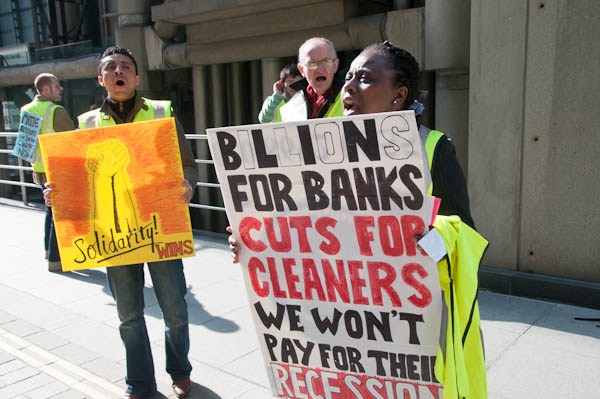
The cleaners who were out again in front of insurance brokers Willis seemed too to embody something both ancient and modern – up against modern capitalism, which seems to espouse a pretty Neanderthal attitude to labour relations, facing up to a modern hi-tech office building with only their voices and whistles.

This was the latest in a series of protests following the sacking of five cleaners – all trade unionists – by the contracting firm, Mitie, which have been going on since mid-February. These protests are unofficial, organised by the cleaners themselves, as their union doesn’t appear to be doing anything to fight their case.

The demonstration on Friday was very much a case of deja-vu, and little seems to have happened since I photographed an earlier protest in the same place two weeks ago.

Cérémonies du 11 novembre

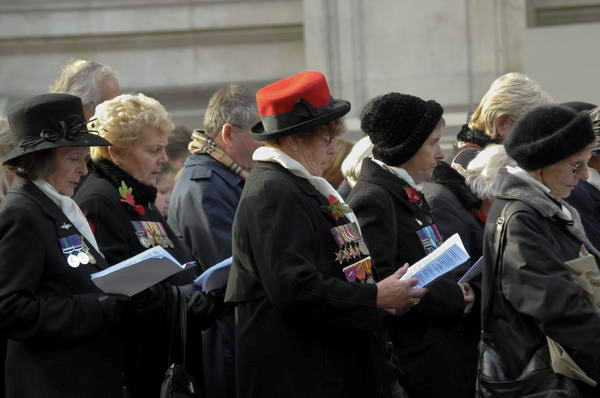
We hadn’t realised that the French still hold their major commemoration of the First World War on armistice day, November 11th, and that it is a bank holiday there – unlike in Britain, where remembrance day is largely celebrated on the nearest Sunday (we officially moved it to that date in 1939 so as not to hamper the war effort), as well as a number of related events at the weekends around – such as the War Widows that I’d photographed on the previous Saturday (8th Nov.)

war widows at Cenotaph

I’d planned a walk around one of my favourite areas of Paris – Belleville and Ménilmontant in the north-east – calling in at a few shows on the route, but by the time we’d got to the fifth place that was closed we were beginning to get the message.  And also rather tired of walking, so we went into the café opposite the town hall in the 20e where I sat down to enjoy a Blonde (the only beer on their list I hadn’t tried before)  while Linda tried to warm herself up with a hot drink.

Rue des Cascades

Suddenly we heard the sound of a brass band, and then saw out of the window an approaching procession, and I picked up my camera and rushed out, leaving Linda to guard my camera bag and half-finished beer.

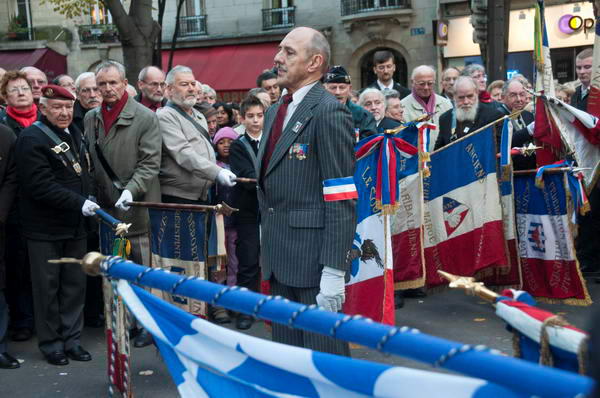
Coming across the place and going down the street towards the back of the town hall was a military band leading various dignitaries with red white and blue sashes,  a couple of banners, a group of children and a small crowd of adults. It was the l’UFAC (Union française des associations de combattants)  and the  Comité d’entente des associations d’anciens combattants et victimes de guerre along with other associations of patriotic citizens commemorating the 90th anniversary of the official ceasefire (at the eleventh hour of the eleventh day of the eleventh month) in 1918, although they were doing it a few hours later in the day.

The parade (which I later found had started at the  Père-Lachaise cemetery just down the road) came to a halt at the back of the town hall where there was a memorial to a Brigadier killed in the liberation of Paris in August 1944. Although the November commemoration in France is for the First World War, there were also groups at the parade remembering the French Jews who were deported and mainly died  in labour and concentration camps in the Second World War.

As an outsider whose oral French is pretty poor it was a little difficult to understand the finer details of the ceremony that followed, in which flowers and a large wreath were laid, and also I found it rather difficult to know exactly how I should behave in photographing the event. I also soon realised I had made a big mistake in not bringing my camera bag in my haste, as the card in the camera was full and after taking a handful of pictures I had to start deciding which images could be deleted so I could continue to shoot.

Nov 11

There were a couple of French photographers  – perhaps from the local press – there, but all they were doing was standing around looking rather bored, and I decided in any case that they were not where I would want to photograph from. You can see a few more photos of the event on My London Diary.

After that they all went into the courtyard of the town hall (another place I’d been hoping to see a show)  and I went back to finish my beer.  Then we decided to take the short walk down to the cemetery and have a walk through there – one place at least that was still open. Again, more pictures of this on My London Diary.

Pere-Lachaise

Metadata shows its worth

On the Photo Attorney web site, I just found a link to a story that illustrates how useful metadata can be. You can read the full account at Kevin German’s Wandering Light blog.

But the bones of the issue are that German found that another photographer he had travelled with had copied his raw files from his computer on the trip, as well as downloading images from his web site, and used these images to enter the UNICEF Photo of the Year  competition. The theft came to light when German sent in the same work.

Perhaps the thief hadn’t appreciated that every image carries a camera identification in the metadata, and German could prove the images were shot on his camera (a Canon 5D.)  You can display the serial number in Photoshop or Lightroom (with great difficulty) but not all software that can read EXIF displays it. One free program that seems to be able to show everything, at least for Nikon (and some other cameras) is PhotoME, which clearly shows the camera serial number in my RAW files (or jepgs shot in camera.) It doesn’t get written into jpegs exported from Lightroom. PhotoMe also shows the shutter count.

It turned o ut that image theft wasn’t the culprits only crime, and as a comment on the post suggests, “he might be the only guy in history to blacklisted from both the New York Stock Exchange and the Photojournalism community at the same time!

German has now registered his entire online portfolio along with the entire RAW shoot from his trip with the US Copyright Office; you can file on-line as a zip containing several hundred files for 35 USD, and he will be visibly watermarking his on-line images from now on.  The latest regulations for electronic uploading seem to make it possible to upload a large collection of works on a fast connection (there is a 30 minute maximum upload time) “made up of multiple published works contained in the same unit of publication and owned by the same claimant” for a single charge, which can now be paid by credit/debit card.  It’s something I’ll be trying out for some of my web images in the near future.

Road Trip

The first work by David Alan Harvey I remember seeing was some of his pictures from Cuba. I still really don’t know how he finds such powerful colour and at times I think he lives in some parallel universe where things are rather less grey than here. Cuba may well be a pretty colourful place, but I think what we see in his pictures owes more to him and his way of seeing than to  the subject matter.

There are over a hundred pictures from his Cuba book on the Magnum web site,  (Harvey joined Magnum in 1993, becoming a full member ub 1997) where you can also see much of his other work and he also has his own site with some interesting work on it, including some by other photographers, as well as information about the workshops he runs. These are not cheap, but I’m sure if you are ready for them could be very much worthwhile.

You can also learn more about his Emerging Photographer Fund, started in 2007, which gave its first annual award of $5000 this year to young British photographer Sean Gallagher to encourage his work on the encroaching desert in China. Gallagher is based in China and has quite a lot from there on his site, as well as some interesting travel photography from other places. Born in 1979, he became a photographer after graduating in Zoology in 2002. He spent a year as a Magnum intern in 2004-5, and his colour work shares some of Harvey’s energy and use of unusual foreground which shows us the subject in a different way. 

But perhaps the most interesting part of Harvey’s site is the blog, Road Trips. Harvey often doesn’t write a great deal on it, but what makes it interesting (and at times infuriating) are the comments.  Not just the odd comment, but literally hundreds of them (and yes, some of these are odd.)

National No More Fur March

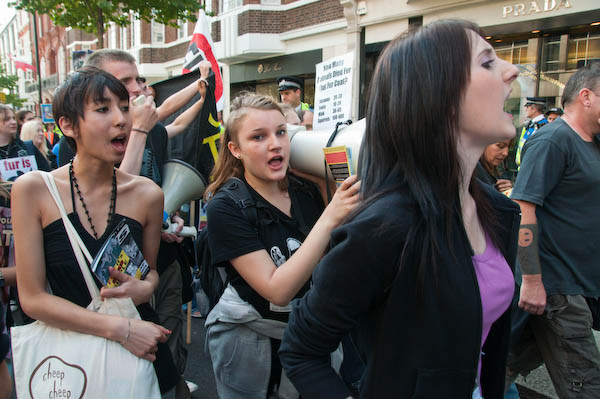
Last December around 2-300 people marched from Belgrave Square in London to Harrods passing many designer shops that sell fur-trimmed garments on the way and voicing their opposition to this cruel, inhumane trade which involves the deliberate and callous ill-treatment of animals. Some of the same people were there for another march on Saturday, but in general it seemed a more middle class and polite affair, with rather more people present, nearer to 500.

Rt Click, View image to see larger
Anti-fur marchers outside Prada, Sept 2008

Looking at this crowd, the organiser’s plea for them to be sensible and not to try anything silly with half the Metropolitan Police watching them (and one of the many vehicles I noticed was from the City of London force) seemed superfluous, while in December there had appeared to be rather more chance of something happening.

Policing did seem to be excessive, with officers all along both sides of the procession and more in front of virtually every clothes shop the march passed – certainly all those that sell fur.  I got pushed in the back by police on several occasions as I stood on the curb to photograph the marchers and was pulled back rather firmly as I walked onto the pavement.  Showing my press card I was told “It makes no difference.” I argued but got nowhere, so simply walked a few yards further up the road (actually towards a fur shop) where the police seemed to have no problem about me going off the road.

For once the FIT team seemed busy photographing demonstrators and I didn’t once notice them photographing me or the other photographers present.  Of course I could just have missed it, but usually they like to make sure people notice they are being watched.

In December, outside Harrods, I’d shot from inside the march:

December 2007 Harrods
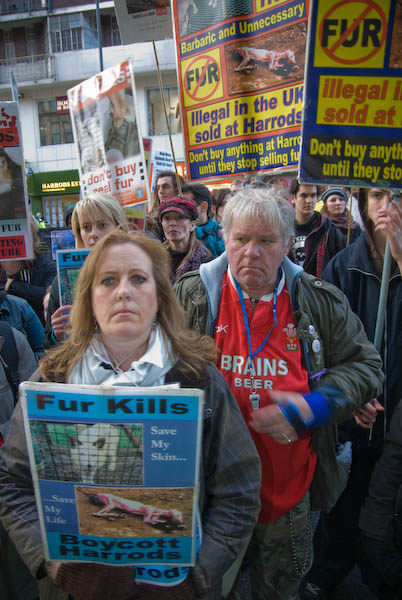
Anti-fur March outside Harrods, Dec 2007

So this time I’d decided to try from the other side of the fence there:

Rt Click, View image to see larger
Anti-fur March outside Harrods, Sept 2008

Harrods is a particular target as the only department store in the country to still be selling furs. As the placard points out we have a peculiar situation here that while fur-farming was banned here, the law failed to ban the import of fur farmed in other countries – under much more cruel conditions than those were allowed before the ban here.

Leica M8 firmware upgrade etc

Any owners of the Leica M8 will possibly be pleased to know that there is now a firmware update 2.000 available for download from Leica  which  adds compatibility with SDHC cards up to 32Gb as well as giving us the Auto-ISO feature as found on the Leica M8.2. This is a free upgrade, but it is apparently impossible to downgrade to previous firmware releases once it is installed, so I’ll perhaps be putting it off for a few days to hear if braver souls have any problems.

From 1 Oct, the chargeable upgrade service promised earlier this year will be available from authorized LEICA M8 Service Centers in the USA, Japan, Hong Kong and Korea and of course Germany. In addition to the improved and quieter shutter and sapphire glass cover, you can also get improved bright line frames. The whole deal does however cost 1320 euros, and given the current exchange rate I think I’ll be leaving that too for a while.

But for richer photographers it does almost make the M8 into an M8.2, though they will still find themselves waiting for the self-timer when they thought they were taking a picture.  So you will still need to tape something onto the top of the camera to restrict the movement – along with the other piece of tape you need to stop the shutter speed dial creeping round when you don’t mean it to.

[Thanks to Sang Tan for telling me about the firmware upgrade – and you can see some fine street documentary on his web site.]

Microsoft Fudges up my Fonts

I’ve long advised people to use browsers other than Internet Explorer. In the old days Netscape did a better job, while for some while it’s been Mozilla Firefox that has been setting the standards.  So until a few days ago I hadn’t bothered to upgrade the copy of IE that I only use for testing web pages from IE6 to IE7.

But people – or most of them – had told me that IE7 was better, and then various sources began to warn that IE6 might be a security risk, and in any case I decided I really ought to be testing my sites on the browser that most people use, which is now IE7 (of course I also test on Firefox.)

Well, the good news is that my computer still works after the upgrade.  But the bad news is that IE7 still doesn’t work properly, and, at least on my computer,  that it managed to mess up my fonts.

With Firefox, the index for my monthly pages  is fixed in position when you scroll down the items on the page. IE7 still ignores the style=”position:fixed;” that achieves this, and I still have to use various unnecessary invisible images to fix some of it’s problems with layout.

But even worse, I found it rendered the text on my pages fuzzy and hard to read, whereas in Firefox they are clear and sharp. IE6 hadn’t looked quite as good, but the difference was small.

Normally I don’t mention computer stuff here, but this is something that messes up virtually everything I put on the web, and will also effect you if you have a web site, so I think it’s important to let everyone know the reason and the solution.

The problem is that IE7 by default uses something Microsoft calls ‘ClearType’. For some people, especially users with very cheap and nasty screens, this is probably a good thing. But most photographers especially will have pretty decent screens and it is likely to actually make your fonts look worse.

So the first thing I tried was simply to switch it off in IE7. Tools menu, Internet Options, Advanced and you will find it under Multimedia.  Clear the box, ok things and it should make it better (you may need to exit and restart IE7 – its the kind of thing Microsoft like.)

Doing that I still wasn’t happy with the fonts – they just certainly a lot better, but still noticeably worse than Firefox, with some odd weak areas in letter shapes.

Clear type has been around since XP came out, but many of us have never felt the need to use it. I went to Microsoft to find out more about it, and took advantage of their ‘Clear Type Tuner’ to alter its settings.  The instructions told me how to turn ClearType on for my display (Right click onthe desktop…  Properties, Appearance, Effects and click in the box to use a screen font smoothing method, then choose ClearType – I found my previous setting was Standard.)  Then I could use their tuner to select the best effect.

Of course I also had to switch on using ClearType in IE7 and then it gave almost as good a display of screen fonts as Firefox.  The only thing left was to go back to the desktop and reset the screen font smoothing method to Standard, as even with the tuned ClearType my desktop was rather less readable than before.

Rather a performance, and one that would have been unnecessary if those arrogant b’s in Seattle hadn’t decided to mess up my computer in the first place.

So, if you are finding my fonts here or on My London Diary hard to read, then you probably either need to install Firefox or sort out your ClearType settings. Or you could just need to see an optician.

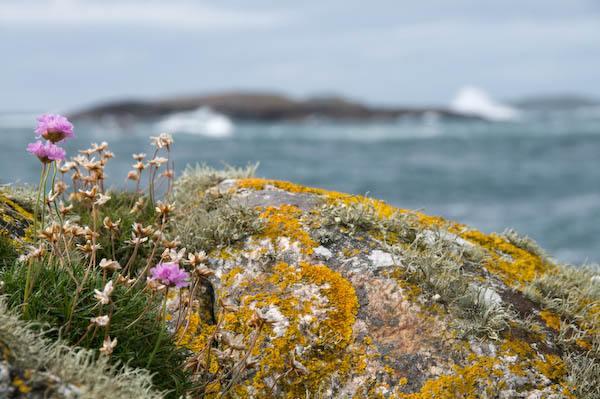
iona- bokeh

Back to photography, I’ve just updated My London Diary with the rest of my pictures from Scotland, including work from Glasgow, Iona and Staffa. The picture above is from Iona and illustrates something I don’t much like about the Nikon 18-200VR lens I wrote about recently. I find it’s rendering of out of focus areas (sometimes referred to as ‘bokeh‘) just slightly unpleasant. Yet another reason for using wide-angle settings where you can get everything in focus!

Prize Pictet

Yet another prize I didn’t enter for is the Prize Pictet, for which the short list of photographers has recently been announced: Benoit Aquin, Edward Burtynksky, Jesus Abad Colorado, Thomas Joshua Cooper, Sebastian Copeland, Christian Cravo, Lynn Davis, Reza Deghati, Susan Derges, Malcolm Hutcheson, Chris Jordan, Carl De Keyzer, David Maisel, Mary Mattingly, Robert Polidori, Roman Signer, Jules Spinatsch and Munem Wasif.

In fact none of them entered as you cannot do so, but they were all nominated by a “global nominations panel of 49 leading experts in the visual arts, from six continents” which “made over 200 nominations from 43 countries” from which the seven judges selected the 18 names above.

In fact exactly the kind of process that fills me with intense gloom about the future of our medium, although there are people among the two carefully selected groups I admire and even a few whose judgement I might respect (and even a few I know.)

This is apparently the ‘Premier Photographic Award in Sustainability‘ although I’m not entirely sure what they mean by this, and even less so by their claim “Pictet is a leading wealth and asset management group worldwide, which aims to be grounded on sustainable business principles for the environment, society and corporate governance.”

Of course there have been other photographic attempts to look at issues related to sustainability. At the end of last year I exhibited work as a part of Foto Arte 2007 in Brasilia, and the theme of that very extensive festival was “Nature, the Environment and Sustainability.”  You can see more about the work I took there, and also read about some of the themes of the lecture I gave there in the posts ‘Under the Car‘, Garden Suburbs and Garden Cities and Architecture and Urban Landscape photography.

Elsewhere on the blog you can also find some of my posts about my experiences in Brasilia, as well as some of the shows from FotoArte 2007 that I was able to see, and on My London Diary the full set of images I showed in Brazil, as well as some of my pictures from Brasilia.

Of course I had no expectation of being nominated for the Prize Pictet, but it is perhaps a little surprising that (unless my memory is wrong) not a single photographer from the very long list of those who took part in that major international festival on the topic is included in the short list.

Better Digital 2

The second instalment of a short series of tips on digital images – see also Better Digital 1

Image size and Resolution

Image size is measured in pixels. When supplying images you will seldom if ever be told what size is needed. A rough guide:

· Full page 3000×2000 px or larger
· Half page 2400x1800px or larger
· Quarter page 1800x1200px or larger

Always set the resolution of images at 300 dpi unless specifically asked to use another figure. Most editors etc have no idea what resolution means, and few seem to know it can readily be changed. Much of the confusion comes about because in Photoshop the ‘Image Size’ dialogue box can be used to do two rather different things. It can change the image resolution and it can ‘resample’ your images. Resampling alters the number of pixels in the image, making it larger or smaller (with photographs you will always want to use either ‘bicubic’ or ‘smooth bicubic’ resampling in Photoshop, although other software offers algorithms that may at times give better results.)

Changing resolution doesn’t actually alter your images, but simply changes a few bytes in the file that contain the resolution figure, which is an instruction to the output device about how to work out the size to make a print. Make sure you un-check the resample box in Photoshop when changing resolution – or you will also resample and thus alter your image size.

Various programs claim to work magic when resizing your images, and over the years I’ve tested and reviewed most of them, usually getting a free copy. My conclusion was that for any normal purposes you don’t need them, but that some, particularly SizeFixer will give a better result if you need to blow up a small image for a giant print – and have a very long time to wait for the result.

Image Quality and Format

Unless specifically asked for TIFF files you can supply JPEG. If awkward customers particularly want TIFFs you will find no problem in converting high quality jpegs to tiff format in Photoshop and sending these!

For supply on CD I would normally use Jpeg quality 11 in Photoshop or 92% in Lightroom
For e-mail, I cut down the file size depending on the page size requested as above and supply at quality 9 or 10.

TIFFs should be supplied uncompressed, in PC byte order. All files should have the appropriate colour profile, sRGB or Adobe RGB, embedded in the file.

Sharpening
Images for reproduction should normally be supplied unsharpened, or only with very slight sharpening (use ‘unsharp mask’ or ‘smart sharpening’ or a specialised sharpening plug-in – my favourite is Focalblade. In Lightroom I always apply ) There should be no visible sharpening artefacts.

You should leave it to the printer (or whoever is preparing work for the press) to apply appropriate sharpening for the printer and output size.

If supplying images for presentations or web use, sharpen these appropriately for use on screen. Again there should be no visible artefacts.

Black and White images
Black and white images are also usually best supplied as RGB files, using the appropriate colour profile, sRGB or Adobe RGB, embedded in the file.

If you know your colour images are going to be used as black and white, it is best to do the conversion yourself. Photoshop offers various ways to do this, and one of the simplest that gives you decent control is the ‘Channel Mixer.’ Lightroom and CS3 have a superior ‘Grayscale Mixer’ and plugins such as B/W Styler give ease of use and special effects as well as similar control for users of earlier versions of Photoshop.

If your black and white images are to be printed as colour, you can produce richer results by the use of small amounts of colour in highlights and shadows – as we used to produce by selenium and other toning methods.

CMYK
Normal colour printing uses the 4 inks Cyan, Magenta, Yellow and blacK, and the printer needs images that are separated into these four colours. However this is a highly technical process and depends on the inks, printer and paper, and it it usually best to supply files as Adobe RGB (or possibly ECI-RGB for European printers.)

If you have to convert to CMYK, you should try to find out from the printer the appropriate CMYK colour space to use, such as SWOP Coated V2 CMYK.

Metadata
Never let any file leave your hands without appropriate metadata. The proposed ‘orphan works’ legislation makes it even more essential to ensure as a minimum that your name, copyright details and contact details are included.

Metadata includes both EXIF data and IPTC data. Cameras write EXIF data into the file on every image that you take, but scanned images don’t have it. Some cameras enable you to write a comment into every file – and mine is my copyright notice. However most software seems unable to read it.

IPTC stands for International Press Telecommunications Council. IPTC data is written into the image file, either as an IPTC header, or using the Adobe XMP format. You can download an IPTC metadata panel to add to recent versions of Photoshop (CS and later.) Some older software cannot read the XMP data, but this is now the standard format.

The uploading module in Lightroom and similar software makes it very easy to set up presets for regularly used metadata (such as photographer, copyright, contact details etc) and also add keywords during the uploading of batches of images from memory cards. You can also easily add headline, caption, country code, date etc.

Workflow
Workflow is a consistent series of steps that you carry out on each image. Mine relies on Adobe Lightroom and can be summarised:

  • Import – copies to hard disk, makes backup, adds keywords and other metadata, adds to image catalogue
  • Selection – deletes unwanted images, gives others a rating (keep, process, etc)
  • Processing of selected images – adjusts exposure, brightness, curve, removes dust, red-eye etc,contrast, reduces noise, sharpens, chromatic aberration, vignetting etc (some handled by presets, some automatic, other image specific)
  • Output – writes files of preset size, quality, colour space etc for particular usage to selected locations

Recommended Software

PC Users: Adobe Lightroom
MAC Users: Adobe Lightroom or Apple Aperture

A very few selected images will need local manipulation in a program such as Photoshop. A good cheaper alternative that can do virtually everything most of us need is Photoshop Elements. There are other programs, but these are so commonly used by photographers that they are usually the best choice.

Other RAW conversion software may sometimes give better results than these, although the differences are generally not great. But none offer the ease of use and in particular the ability to catalogue your images. For Nikon cameras, the ultimate results seem to come from the Nikon Capture NX software, but its a pig to use compared to Lightroom.

I routinely process everything in Lightroom, writing full-size jpegs at quality 92 of selected images – that can be resampled if necessary if I need larger files for a particular purpose – or even converted to TIFF if necessary.

I run a second selection on these results and resize and convert to sRGB for web use, using ACDSee Pro (I got a free copy of this, but had previously bought it as my general purpose image viewer.)

Those few images when I want a high quality print – perhaps for exhibition use – I’ll try using Capture NX, and see if I can get a better result. Then I’ll do a little tweaking in Photoshop before either printing or sending out for printing.

Some free/cheap software for PC:

Raw Therapee
This looks excellent for converting RAW files to jpeg, giving results on the few images I’ve tried as good as the most expensive software. Where it seems to miss out is in workflow and speed.

PTLens
A dirt cheap plug-in for Photoshop (it can alsobe run standalone) that, when I tested it, out-performed a commercial program costing over ten times as much. It automatically corrects pincushion or barrel distortion and has the great advantage that it can work for any lens on your camera. If you have a lens that isn’t already covered you can take some suitable pictures and get it added.

Irfanview
This is a good file viewing program that also allows you to do some basic image correction, as well as allowing you to use some Photoshop plugins. It is free for private, non-commercial use and very cheap for business use.

There may at some point be a Better Digital 3 in this series – but don’t hold your breath!